
Having WhatsApp available for your store is easy. But the real opportunity is in knowing how to use it at each step of your customer journey. A potential customer making inquiries, making a purchase, cancelling the purchase, or returning after months can all trigger the start of an important conversation.
The following workflow will help store owners understand how they can leverage the potential of WhatsApp strategically. It will also give an understanding of what actions should be taken at each stage and what benefits store owners can reap from that.
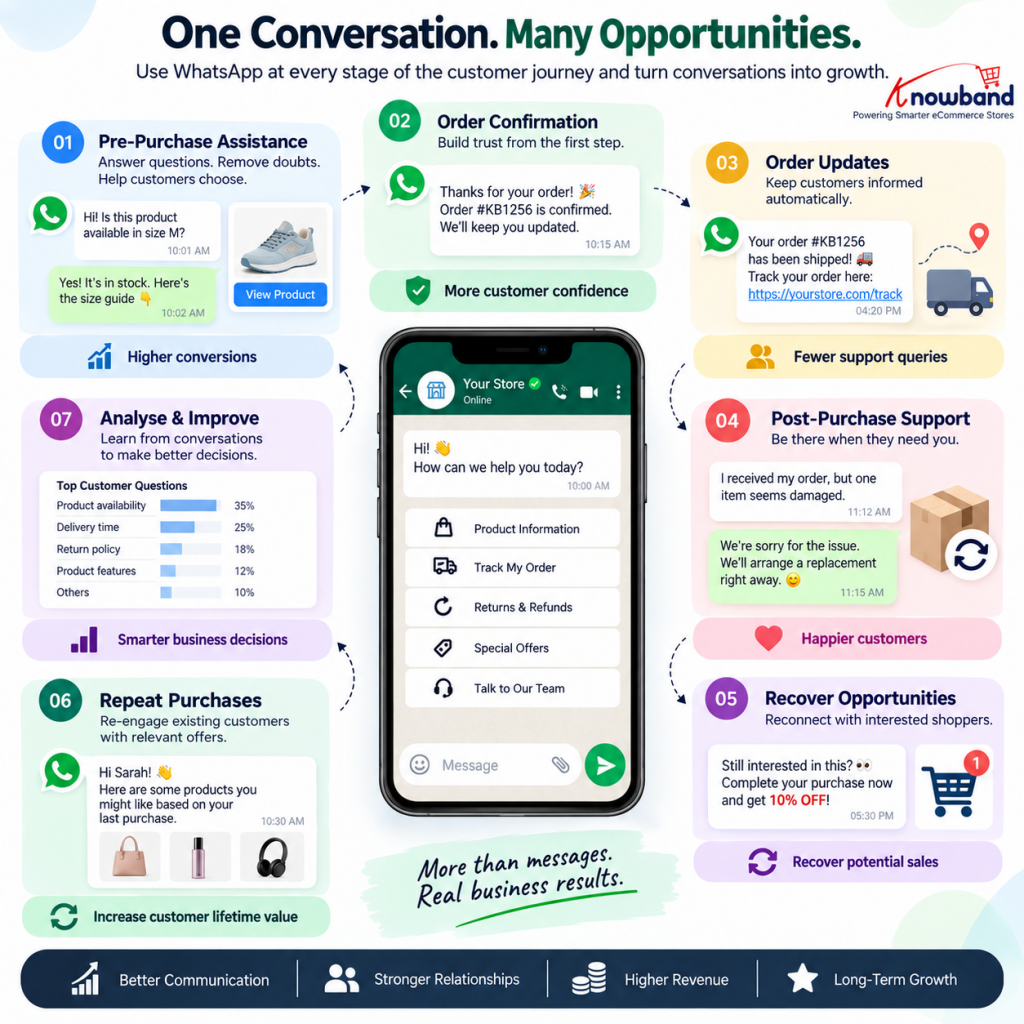
1. Initiate Conversation Before Making a Purchase
What should you do when a shopper has a question before buying? Make it easy for them to get a quick, relevant answer instead of leaving the store to find one elsewhere.
A shopper may be unsure about suitability, delivery, availability, returns, or which option to choose. Give that customer a direct path to your team.
Identify the aspects that cause some uncertainty for your customers in your store. Customers may have various questions related to the product selection, its compatibility, availability, or delivery options.
Example: A customer asks you some questions regarding the product compatibility. Your team answers their concerns recommend the appropriate option, instead of just sharing a random sales message with them.
Impact expected: Increased likelihood to make the purchase, decreased reluctance due to a more confident shopping experience, and increased conversion opportunities among interested visitors.
Integration of PrestaShop WhatsApp CRM by Knowband into your PrestaShop website will enable you to use it in the assisted-selling workflow. The module helps bring these conversations into the store’s customer communication process instead of leaving them scattered across individual chats.
2. Turn Every Genuine Enquiry Into a Structured Conversation
The client asking some questions does not necessarily mean that he/she will buy your product. What will you do next? The communication process must help your team get acquainted with the customer’s needs and make a further step.
A practical workflow is:
Customer enquiry → identify the concern → provide relevant information → recommend the next step → follow up when appropriate.
Do not push an offer immediately. If the customer needs product information, give them that first. If the customer needs reassurance about the delivery process, respond to their concerns.
Impact expected: Improved quality of customer interactions and improved chances of converting high-intent queries without forcing the purchase.
An OpenCart WhatsApp Integration Extension can be used for this purpose by connecting WhatsApp activity more closely with the store environment.
3. Keep Customers Informed After They Order
Why wait for customers to ask where their order is when you already know what is happening? Map the important stages after an order is placed and communicate relevant updates proactively. Confirmation, processing, shipping, and other important status changes are natural points for communication.
For example:
The customer placed an order → confirmation → update of the order status → shipping update → order delivery.
The WhatsApp order notifications for PrestaShop and WhatsApp order notifications for OpenCart by Knowband will be useful in this context as part of the overall customer journey.
Impact expected: Customers get the information they require in a timely fashion, reduce uncertainty, and free up your support teams from answering the same questions.
4. Recover Customers Who Do Not Complete Their Journey
Can WhatsApp help recover a potential sale that appears to be lost? Of course, if the customer has already shown their desire to buy your goods and there is an appropriate reason for contact.
Identify your customers who have come to your store but did not buy anything there. Offer no discounts to them; try to identify the reason for their inactivity.
The workflow may include the following steps:
Identify high-intent customer → understand the possible obstacle → send useful clarification → invite them to continue when ready.
If the customer was unsure about a product, answer that question. If they needed more information, provide it.
Expected impact: Some otherwise-lost buying opportunities can return to the purchase journey without relying entirely on discounts.
This is where Knowband’s OpenCart WhatsApp CRM can become more than a support tool. The extension provides merchants with a structured way to manage customer conversations and follow-ups from within the store workflow.
5. Continue the Relationship After Delivery
The process shouldn’t stop once the product arrives at the doorstep. What should you do after delivery? Give customers a reason to stay connected with the store.
Start with support. Make it easy for customers to raise questions or concerns about their purchase. Next, identify valuable feedback that will enhance the experience.
When clients frequently ask you similar questions after buying some products, this data will be useful to you when creating a new description or guide.
Expected results: Improved customer experience and understanding of how to improve your store.
Both PrestaShop WhatsApp Manager and OpenCart WhatsApp Manager by Knowband can help you to handle these conversations properly.
6. Create a Reason for Existing Customers to Return
How can WhatsApp contribute to repeat purchases without becoming another promotional channel? By making follow-ups relevant.
Use previous purchases and customer conversations as context. If a customer may reasonably need a related product, a replenishment, or an update about something relevant to their interests, reconnect at an appropriate time.
WhatsApp is not the only channel that can help merchants maintain an ongoing relationship with existing customers. You can also explore why eCommerce stores can benefit from having a mobile app alongside their website when planning a broader retention strategy.
The workflow is:
Previous purchase → identify a relevant future need → send useful communication → encourage the next purchase.
Don’t send identical messages to all the customers; make your communications relevant rather than frequent.
Expected result: Enhanced relationships with customers and increased potential to earn money from existing customers.
7. Turn Conversations Into Improvements for the Store
Your WhatsApp conversations can tell you things your analytics cannot.
What should you look for? Questions, objections, requests for products, shipping problems, and other reasons why customers hesitate to buy something.
For example, if customers are always inquiring about a certain product feature that is indeed stated on the webpage but is difficult to spot or understand, then utilize these lessons to improve the quality of your webpage.
These improvements should not be limited to product pages and customer support content. Store owners can also use the information gathered from customer interactions as part of a broader eCommerce optimization process, including reviewing technical SEO, product-page structure, metadata, internal linking, and other areas that affect how easily customers discover and understand the store.
For PrestaShop merchants working on these areas, a practical PrestaShop SEO audit checklist
Expected result: Better content of the website, fewer unnecessary inquiries, successful purchases, and improved customer experience.
The Complete WhatsApp Workflow
The most effective approach is to connect these individual actions into one customer journey:
Pre-purchase assistance → purchase confidence → order communication → support → recovery → retention → customer insights → continuous improvement.
The solution is Knowband’s PrestaShop WhatsApp CRM and OpenCart WhatsApp CRM play a major role in implementation. Rather than using WhatsApp just like any other inbox, merchants can create an organized process of communication during those critical moments using these modules. Understanding how customers discover information through AI-powered search can also help merchants think more carefully about the content and answers they provide throughout the buying journey.
For a broader look at how AI is changing the way customers discover and evaluate information online, see this strategic guide to AI search.
The objective is not to send more WhatsApp messages but to ensure that each important conversation becomes beneficial both for the customer and for the business.
When the right message is sent to the customer at the right time, Opencart WhatsApp CRM could do more than just be a communication tool and become part of the conversion, support, and retention process.


