
You may have Reels, UGC, product demos, influencer videos, or AI-generated content. But does any of them really help drive sales for your online store, or are you simply spending time and money creating and posting content without knowing what it is really delivering?
The answer is more about how strategically you are using the videos, and not how many videos you are generating. Which products deserve video first? What should each video communicate? Where should it appear? And how should you determine the worth of investment?
This tutorial will show how to develop the best video strategy for your PrestaShop store in 2026 – from choosing the right products and creating relevant video content to placement of videos for purchase assistance, production scaling, and evaluation of their commercial potential.
Select the Right Products for Video Creation
Don’t start by randomly choosing products and generating videos for them. Start with products where video has the highest potential to remove purchase friction.
Look through your catalog and select products based on:
- High traffic and low conversion: People come because they are interested in the product, but something prevents them from purchasing it.
- Items that are hard to describe by images: Video can better demonstrate usage, proportions, movements, textures, or even functionality.
- Products with frequent customer questions: Video can answer common pre-purchase concerns visually.
- New products: Visual content can give new arrivals stronger exposure during launch.
- Products already performing well on social media: Bring proven content into the store and closer to the purchase decision.
Avoid starting with products where a video adds little information or where there is no clear customer question to answer.
This makes a PrestaShop video integration Addon part of a prioritization strategy for products.
Decide What Each Video Should Help the Customer Do
Once you’ve selected the products, decide what the video needs to achieve.
Don’t create a generic product video just because the product doesn’t have one. Create video content that addresses the issue:
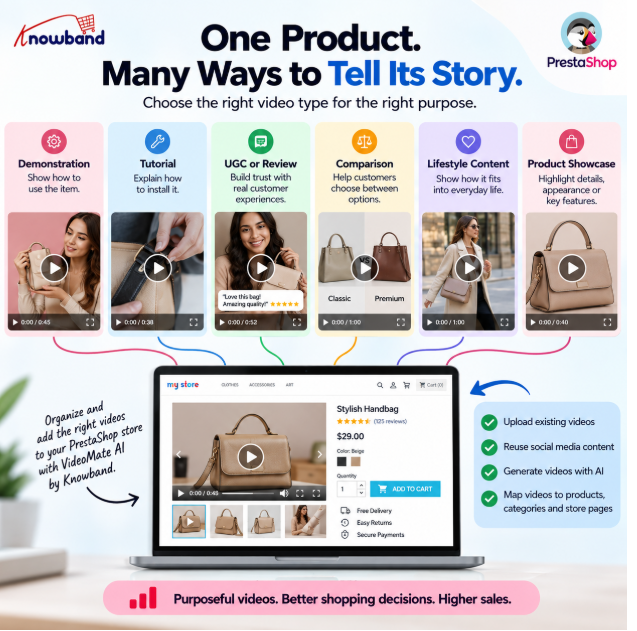
- Demonstration: Show how to use the item.
- Tutorial: Explain how to install it.
- UGC or review: Address trust and real-world usage concerns.
- Comparison: Help customers differentiate between comparable products.
- Lifestyle content: Explain the product’s role in day-to-day life.
- Product showcase: Highlight appearance, details, or functionality.
A PrestaShop video integration Addon becomes more valuable when every video has a defined purpose instead of becoming part of a random content library.
Are Your Best Videos Stuck on Social Media?
If your answer is yes, you’re leaving part of your existing content investment outside the shopping journey.
By the time your Instagram Reel, influencer video, or UGC lands the customer on your website, they might only be looking at the photos, product description, price, and reviews of the product.
Bring relevant content into the store instead of making customers search for it again.
A Product video manager for PrestaShop can help organize existing video content and connect it with the products or categories it supports. That means content created for social discovery can continue working when the customer reaches the store.
Knowband’s PrestaShop video integration Addon supports adding downloaded social-media videos and associating them with relevant store content, giving merchants a practical way to reuse assets they have already created.
Add Video Where Customers Actually Need It
Don’t add video everywhere just to increase video coverage.
Choose placement according to the customer’s intent:
- Homepage: Build awareness around products, launches, or campaigns.
- Category pages: Help shoppers understand collections and discover products.
- Product pages: Answer product-specific questions before purchase.
- Best Seller sections: Give proven products additional visual support.
- New Product sections: Help recently launched products gain attention.
Research from Baymard found that 41% of users in its product-page usability testing watched product videos. More importantly, its research found that discoverability matters: users generally expect videos alongside the product image gallery, while poorly placed videos can go unnoticed.
So the question isn’t simply “Where can I add a video?” It is “Where is the customer most likely to need this information?”
That is the difference between basic video placement and a strategic PrestaShop video integration Addon for your store.
Use Product Pages to Answer Purchase Questions
A product page should provide the necessary details for making the purchase decision.
The video should assist the process rather than beautify the page.
Before adding a video, identify the information a customer may still be missing:
- How does the product work?
- What does it look like in real use?
- How is it used?
- What does it look like from different angles?
- What makes it different from alternatives?
- Is there something difficult to explain through text alone?
Baymard’s research identifies the product page as a central part of the purchasing decision and recommends making product videos easy to discover alongside product imagery.
This is where a PrestaShop e-commerce video module should support the product-information strategy: use video to close an information gap, not simply to fill empty space on the page.
Scale Product Video Creation with AI
A strategy that works for ten products may become impossible when your catalogue contains hundreds.
Rather than spending manual effort in generating videos for each product, determine how AI can help save time and maintain the priorities you’ve already established.
Begin with those products that you have already determined to be high-impact, and then craft a format and prompts according to the needs of each product.
An AI Video Generator Module for PrestaShop can help make this approach more scalable. Knowband’s PrestaShop Videomate supports AI video generation using models from OpenAI and Gemini, with product information and images available as inputs.
Reuse Content Before Creating More
Before producing another video, audit what you already have.
Check your:
- Instagram Reels
- YouTube Shorts
- Influencer content
- UGC
- Product demonstrations
- Promotional videos
- Existing campaign assets
If a video already answers a product question, give it another purpose inside the store and don’t let it remain limited to the platform where it was originally published.
This approach makes a Product video manager for PrestaShop useful beyond simple storage. It becomes a way to organize existing content around products and shopping objectives.
PrestaShop Video Manager by Knowband supports video mapping across products, categories, homepage areas, Best Sellers, and New Products, allowing merchants to connect content with specific parts of the storefront.
Measure Whether Video Is Worth the Investment
Do not measure the success of the strategy based on views and likes alone.
For ecommerce, ask:
- Are video-supported products receiving stronger engagement?
- Are customers interacting with the product after viewing the video?
- Which products benefit most from video?
- Which video types are worth producing again?
- Is video helping customers understand products before purchase?
The objective is to move from “How many people watched this?” to “Did this content help the customer make a buying decision?”
That makes your PrestaShop video integration Addon strategy measurable and easier to improve.
A Practical Way to Implement the Strategy
Once the strategy is defined, you need a practical way to execute it inside your store.
VideoMate AI – PrestaShop Addons by Knowband brings together video management, product and category mapping, storefront placements, social-content reuse, and AI-assisted video generation.
Knowband’s approach allows merchants to move from simply having video content to actually organizing where and how that content appears across the store.
For a growing catalogue, that makes a PrestaShop e-commerce video module useful as part of the wider content workflow, not as another isolated marketing tool.
This PrestaShop Video Manager also provides AI-assisted generation that can help merchants expand product-video coverage when manual production becomes difficult to maintain.
Start with Strategy, Not Video Production
The biggest mistake is starting with video production.
Start with the product. Identify the customer’s information gap. Choose the right video format. Decide the right placement. Reuse existing content where possible. Use AI when production becomes a limitation. Then measure whether the video is contributing to the shopping experience.
The PrestaShop video integration Addon by Knowband can provide the infrastructure, but the strategy determines whether that infrastructure creates value.
Don’t aim to have the most videos on your store. Aim to have the most purposeful ones.

