
Following the PHP security updates released on October 21, 2026, hosting providers and website owners have been working to patch vulnerable PHP installations. However, applying a security patch fixes the vulnerability but does not confirm whether an attacker exploited it before the update was installed.
At Knowband, we have started working on the client end to address the potential impact of the October 21 PHP security update and help our clients protect their PrestaShop stores. We understand how critical website security is for your business, and our team is committed to providing the necessary technical assistance and guidance during this process.
After your host has installed the patches on your PHP installation, it might seem like the job is done. But the truth is far from that. Nonetheless, even though the patch is going to fix the issue, it does not give you any information on whether an attack was launched against you or not. In order to determine whether your PrestaShop was attacked, there are three things you should take into account: server logs, disk files, and the Back Office.
The timing is why this matters. PHP released fixes for CVE-2026-109618 and CVE-2026-109619 on 21 October 2026. Sophos reports that the PHP project received the first reports on 11 August, and that Amazon Threat Intelligence saw an exploitation attempt on 17 October, four days before the fix. The PrestaShop project’s advisory is clear that the flaws are in PHP, not in PrestaShop or its modules. So the Back Office can’t detect the exploit itself, but it can reveal what an attacker did afterwards.
Which Stores This Applies To
Every store running PHP is in scope, whatever the PrestaShop version. What differs is what “patched” means.
The fixed PHP releases are 8.5.12, 8.4.27, 8.3.36 and 8.2.35. The PrestaShop advisory notes that stores on PrestaShop 1.7 and 8.x often run PHP 7.x or 8.1, which no longer get official updates. PHP published minimal backports for 7.4, 8.0, and 8.1, and many Linux distributions ship their own patched packages. If that’s you, “patched” depends on your host’s package, and the version number can look old even when the fix is in.
The advisory also says not to rush a major PrestaShop upgrade as an emergency response. Patch PHP now and plan the upgrade separately.
The screens in this article come from a PrestaShop 9.1.4 store. Some Back Office pages differ or don’t exist on older versions, and the notes below say where.
How sure is anyone that attacks happened?
Sources disagree. watchTowr says it has seen both flaws exploited in the wild. Bitdefender reported no exploitation in its own telemetry as of 22 October. Tanium noted, around 21 October, that neither CVE was in CISA’s known-exploited catalog and no public indicators had been released. That picture can change, so check current advisories.
Treat the checks below as due diligence on a credible risk, not proof of a breach. Most stores that run them will find nothing.
Patch First, Then Preserve What You Can
For a flaw that needs no login and has reported attacks, don’t hold back the patch to collect evidence. Bitdefender’s advice is to patch and then check.
If you manage your own server and can do it in minutes, grab these first. If your host already patched, the restart has happened, so skip ahead.
- Logs. Copy the web server access and error logs and the PHP error log. Hosts rotate and delete them.
- A process list. On a VPS, save the output of ps -eo pid,ppid, user, args –forest.
- Backups. A database dump and a full copy of the shop directory, kept offline, give you something to compare against.
Logs contain customer IP addresses and other personal data. Store them securely and delete them when the investigation ends.
How to Check Server Logs for PHP2Shell Signs
Begin with the server instead of PrestaShop. According to Abstract Security, exploitation occurs at a level below the application layer; thus, there might be no logs available on your application’s end.
Which dates? Datadog and Bitdefender suggest starting at 17 October 2026. Sophos recommends reviewing from 1 August. If your logs go that far back, use the wider window.
What to search for
- A PHP fatal error ending in “in Unknown on line 0”. It means PHP failed while setting up the request, before any script ran.
- Apache `AH00052` entries, which record a child process dying from a signal such as a segmentation fault.
- Very large POST requests, especially ones followed by connection resets or crashes.
- Multipart POSTs to pages that don’t take uploads, or requests containing PHP_SESSION_UPLOAD_PROGRESS (from Sophos). Context matters: contact forms with attachments, product customisation, CSV imports, Back Office image uploads and module uploads all send multipart requests legitimately.
Older rotated logs are usually gzipped, and plain grep skips them, so use zgrep. Paths vary by distribution and panel.
# Apache
zgrep -h “in Unknown on line 0” /var/log/apache2/error.log*
zgrep -h “AH00052” /var/log/apache2/error.log*
# Nginx + PHP-FPM: worker crashes show up in the FPM log instead
zgrep -hE “exited on signal (6|7|11)” /var/log/php*-fpm.log*
A single “Unknown on line 0” line proves nothing, since genuine memory exhaustion causes it too. Many access logs don’t record request bodies, so you may only see sizes. And a successful exploit can avoid both the crash entry and the memory error, so a clean log doesn’t clear a server. As Bitdefender puts it, crash logs measure attempts, not compromises.
Check for shells, cron jobs, and outbound connections
Datadog calls a shell started by a web worker the most direct evidence of success. Look at your server where you have access to sh, bash, curl, or wget for apache2, httpd, php-fpm, or php-cgi. A normal store does not need any of these commands run by the web user.
Then check persistence. A cron entry can quietly re-create a shell you delete. The web user may be www-data, apache, or nginx.
ps -eo pid,ppid,user,args –forest
crontab -u www-data -l
ls -la ~www-data/.ssh 2>/dev/null
ss -tnp | grep -Ei “php|apache|httpd”
These need root or sudo. Without it, other users’ crontabs, .ssh folders and process names come back empty, and an empty result isn’t a clean one. On shared hosting you can’t run them at all. Ask the host to check for shell processes, unexpected cron jobs and the signatures above, and to reply in writing.
Scan Your PrestaShop Files for Planted Code
After code execution, attackers usually leave a way back in. That’s typically a small PHP file in a folder the web server can write to. Run these from the shop root.
Look where PHP shouldn’t be
Bitdefender suggests checking upload, cache, and tmp locations. In PrestaShop, scan img/, upload/, and download/. Real images and uploads aren’t PHP, and attackers use other executable extensions too. Leave var/cache out of this scan: on 1.7 and later it’s full of legitimately generated PHP, and it would bury real hits.
find img upload download -type f \
\( -iname “*.php*” -o -iname “*.phtml” -o -iname “*.phar” -o -iname “*.pht” \) \
! -name “index.php”
However, omitting index.php is required to reduce noise, but this will make a blind spot as the attacker can overwrite the placeholder file. Since PrestaShop placeholder files are almost identical, here are the rare ones with their paths:
find img upload download -name index.php -exec md5sum {} + \
| awk ‘{c[$1]++; p[$1]=p[$1]”\n “$2} END {for (h in c) if (c[h]<3) print h p[h]}’
Also check .htaccess files. A modified one can make images executable. As for the cache, don’t inspect it. Once you’ve saved your evidence copy, delete var/cache/prod and var/cache/dev. PrestaShop regenerates them, and anything planted there goes too.
Use change time, not modification time
Attackers routinely reset modification time with touch. Ctime can’t be modified, and so is the ideal filter. Noisiness is expected from valid installations and upgrades. The goal is to pair each access to some action taken by you or the developer. A note, however: if the store was migrated, restored, or had permissions changes made after 1 August, every file will have a recent ctime.
find . -type f \( -name “*.php” -o -name “.htaccess” \) \
-newerct 2026-08-01 -not -path “./var/cache/*”
Run PrestaShop’s changed-files check, and know its limit
Go to Advanced Parameters → Information and scroll to List of changed files. PrestaShop compares the core files with their originals in your PrestaShop version and tells you what has been changed and what is missing. This process might take some time, and it needs access to PrestaShop’s servers. If it does not complete successfully, do not consider this as being fine.
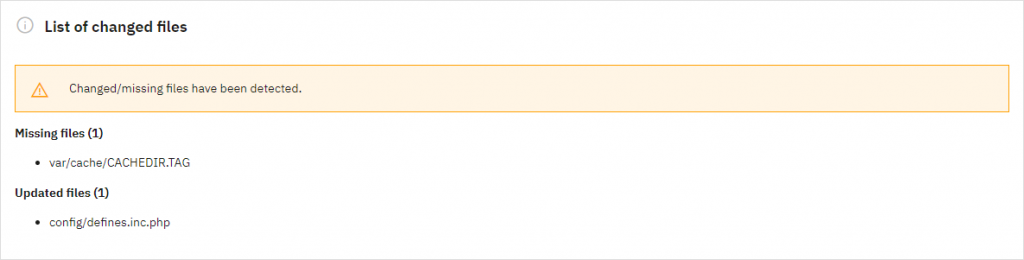
Advanced Parameters → Information → List of changed files.
On our 9.1.4 store, it detected that there is no var/cache/CACHEDIR.TAG and also that the file config/defines.inc.php had been changed. But neither is too worrying in context: the former is a debug setting on the latter, and both files aren’t too important. That’s why one should find out why each entry exists.
A core file changed with no explanation from your team is serious.
The important limit: this check reports modified or missing core files. Since it does not detect new files, which happen to be the location where the webshell resides, as well as not evaluating the modules, themes and uploads, it should only be used together with the find command above.
The same page lists overrides, which replace core classes and run on every page. On older versions, inspect the override/ directory directly.
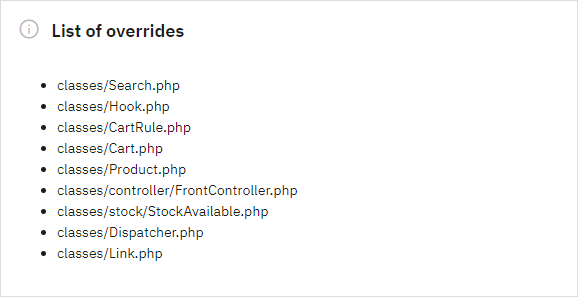
The list of overrides. Every entry should have an owner you can name.
Search for suspicious functions
grep -rlEi “\b(eval|assert|system|shell_exec|passthru|proc_open|popen|gzinflate|str_rot13|base64_decode)\s*\(” \
–include=”*.php” –include=”*.phtml” \
modules themes override img upload download YOUR_ADMIN_FOLDER
# Root-level PHP files: compare against a clean download of the same version
find . -maxdepth 1 -type f -name “*.php”
Replace YOUR_ADMIN_FOLDER with your real admin directory name, since many owners rename it. This is noisy. Plenty of legitimate modules call base64_decode, and attackers can hide calls behind variable functions. Treat the output as a list to review by eye, starting with anything in img/, upload/ or download/.
Check the Back Office for Signs of Tampering
If an attacker ran code, they may also have added themselves to your store. These checks work on shared hosting too.
Employees and sessions
Open Advanced Parameters → Team → Employees. Every account should belong to someone you know. An unrecognised SuperAdmin is a red flag.
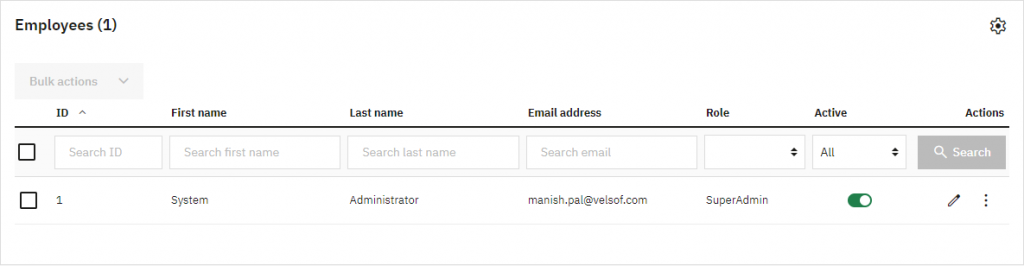
Team → Employees.
Security → Employee Sessions lists back-office sessions with the employee and last-update time. It’s missing from older versions, so there you can run this read-only query instead. Adjust the table prefix, and id_profile = 1 is SuperAdmin.
SELECT id_employee, firstname, lastname, email, id_profile, active,
last_passwd_gen, last_connection_date
FROM ps_employee ORDER BY id_employee DESC;
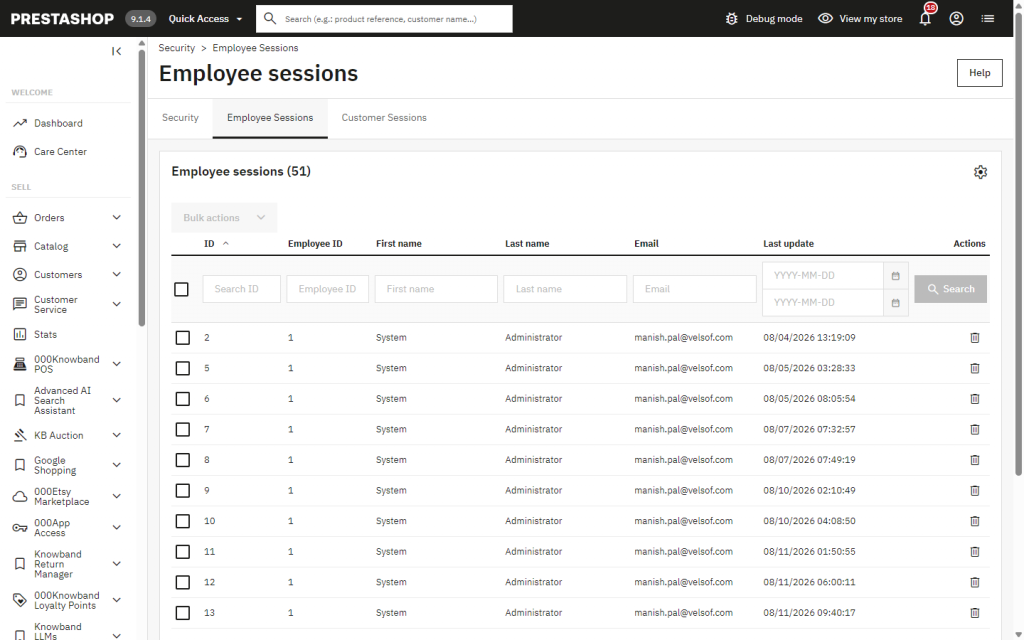
Security → Employee Sessions (shown on 9.1.4).
Sophos also advises reviewing successful admin logins since 1 August. The Logs page on our store doesn’t record logins, so use last_connection_date from the query above, or ask your host for access logs of the admin URL. Check what your own version records.
Logs, modules and API keys
Advanced Parameters → Logs records events inside PrestaShop, such as module installs and upgrades, with an employee and timestamp. On this store it does; confirm what yours logs. An install you don’t remember deserves an explanation. It reflects only actions taken through PrestaShop, so it can look spotless after a server-level breach.
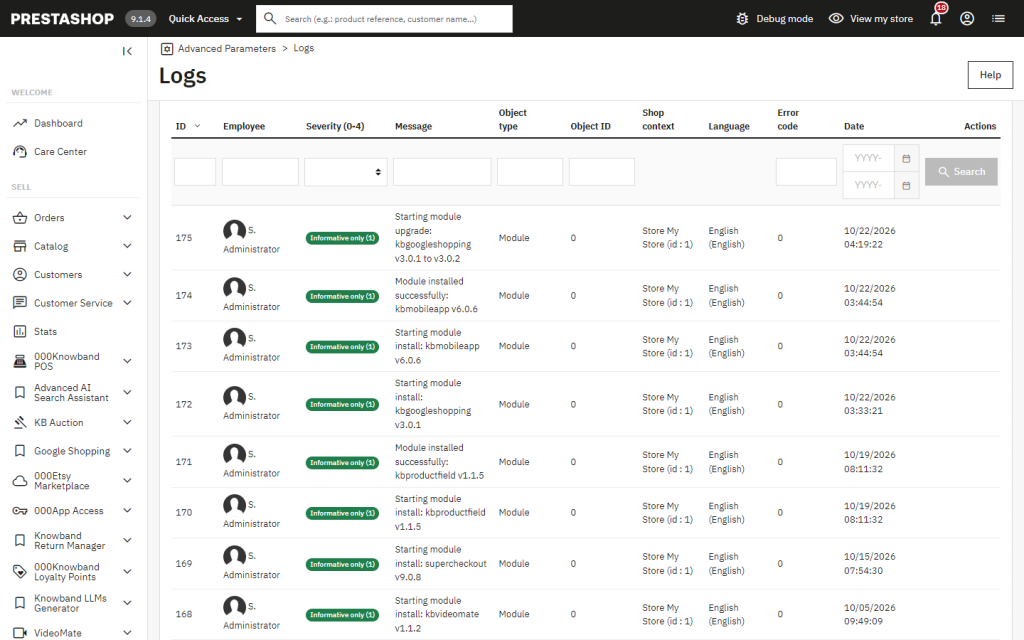
Advanced Parameters → Logs.
In Modules → Module Manager, check each module’s name, version and author. A module you never installed, or one with a vague name and no real author, needs checking.
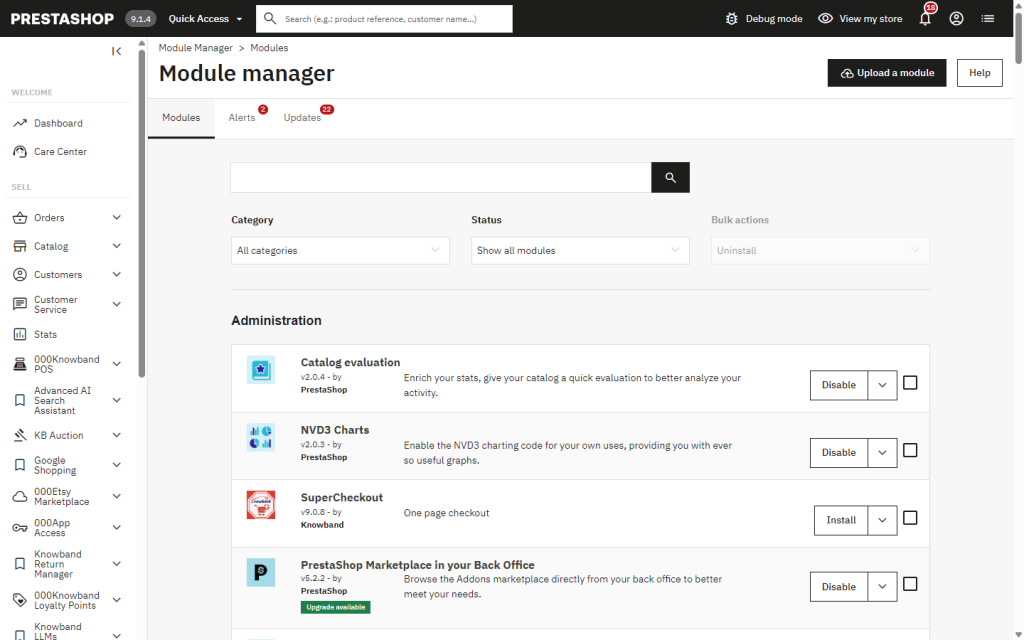
Module Manager.
In Advanced Parameters → Webservice, the keys should be only ones you created. Attackers sometimes add a key for quiet access.
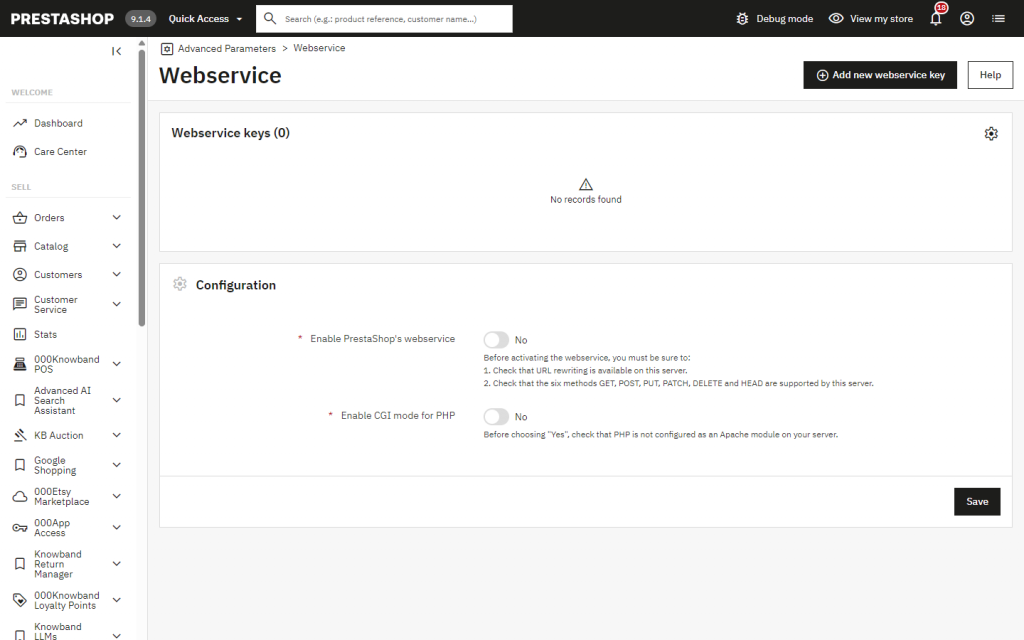
Webservice. Zero keys is expected unless you use the API.
Payments, emails and the storefront
Attackers who want money go after checkout. Review your payment modules’ credentials and redirect URLs, bank wire account details, order notification email addresses and SMTP settings. A changed payout detail is easy to miss.
Open the checkout page privately with DevTools’ Network Tab active and try to identify any scripts running from domains you aren’t familiar with. Also search theme JavaScript files and the database for <script content you didn’t add. These read-only queries cover configuration values and CMS pages (adjust the prefix and run them in your database tool):
SELECT name FROM ps_configuration WHERE value LIKE ‘%<script%’;
SELECT id_cms, id_lang FROM ps_cms_lang WHERE content LIKE ‘%<script%’;
Some modules legitimately store scripts, such as analytics tags, so review each hit. Skimmers sometimes serve only first-time visitors, so don’t rely on one look.
Reading the Results
| What you found | What it likely means | Next step |
| Nothing unusual anywhere | No evidence of compromise, not a guarantee | Keep the logs, re-check after a week |
| Only “Unknown on line 0” or AH00052 lines | Possible attempts or ordinary memory errors | Check files, processes and cron before deciding |
| A shell under a web worker, or an odd cron job | Strong sign of success | Treat as compromised |
| PHP in img/, upload/ or download/ | Almost certainly planted | Treat as compromised |
| Unknown SuperAdmin, API key or module | Someone has access | Treat as compromised |
| Unexplained core file change | Needs an answer fast | Compare with a clean copy of your version |
If You Find Something: Contain, Then Rebuild
Don’t just delete the one suspicious file. Work through this order.
- Cut off access at the server level. PrestaShop’s maintenance mode isn’t containment. It’s an application setting the exploit fires before PrestaShop runs, and a shell in img/ or upload/ is requested directly by URL. Block the site using the web server, firewall, or the host. Save a backup of the content that was found first.
- Patch PHP and restart all workers.
- Revoke old credentials at the provider straight away: payment gateway, SMTP and any cloud keys. Do this from the provider’s side, because anything on the compromised server is readable by an attacker. Don’t set new secrets there yet.
- Rebuild rather than clean in place. After confirmed code execution, shells can sit in modules, themes, cron or outside the web root. Deploy known-good code to a clean environment and restore only a database you’ve reviewed. A backup helps only if it predates the attack.
- Set new secrets only on the clean environment, as Bitdefender advises rotating everything the PHP process could read. For PrestaShop version 1.7 and later, you have to set the database settings, along with the secret and cookie keys, in the file app/config/parameters.php. If there is any change in parameters.php, then you have to flush var/cache/prod and var/cache/dev because the cached container will not get the updated values. New cookie keys invalidate sessions, which helps here. They can also affect older accounts still using legacy password hashes, so test first and plan a customer password reset.
- Reset every employee password and remove unknown accounts, API keys, and modules.
- Review your legal obligations and consult a professional for more guidance. If there is intrusion at the server level, this will cause complete exposure of all customers’ details such as names, email addresses, addresses, and hashed passwords.
One more habit: the store in our screenshots runs in debug mode for development. Never leave it on in a live shop.
Keeping the Module Layer Tidy
PHP2Shell was a server flaw, but unused and outdated modules give attackers more places to hide. Once you’ve settled the compromise question, remove what you don’t use and update what you do. If you’d like a second opinion on a store’s modules before a PHP change, the Knowband team can review the setup on a staging copy.
Conclusion
To check if your PrestaShop store was hacked before the PHP2Shell fix, work from the outside in: scan server logs, processes and cron for the published signs, hunt for stray PHP files, run PrestaShop’s changed-files check while remembering it can’t see new files, and confirm that every employee, module, API key and payment setting is one you recognise. Most stores will come out clean, and the checks are cheap next to learning about a breach months later from a payment processor.
Patch first. Then check. Patching answers “is the door closed?” and the checks answer “was anyone already inside?”
Sources
- PrestaShop project, PHP security updates (October 2026): https://build.prestashop-project.org/news/2026/php-security-updates-october-2026/
- Datadog Security Labs, PHP2Shell detection and analysis: https://securitylabs.datadoghq.com/articles/php2shell-critical-vulnerabilities-in-php/
- Bitdefender, technical advisory on PHP2Shell: https://www.bitdefender.com/en-us/blog/businessinsights/technical-advisory-php2shell-pre-auth-rce
- Sophos advisory SA-20261021: https://www.sophos.com/en-us/security-advisories/sophos-sa-20261021-php2shell
- Knowband Guide to Critical PHP Vulnerabilities and Security Updates 21st October 2026:https://www.knowband.com/blog/prestashop-blog/critical-php-vulnerabilities-updates-2026/

