
Checkout abandonment in Prestashop happens primarily because the default multi-step checkout creates unnecessary friction. Store owners can overcome this by switching to a Prestashop one-page checkout solution, combining billing, shipping, payment, and order or review information into a single, fast interface that keeps customers moving toward purchase.
Why does checkout abandonment happen in Prestashop?
Getting to the bottom of why customers leave the order in the middle. More often than not, the issue has nothing to do with your product or pricing; it comes down to the checkout experience itself. Small annoyances that might go unnoticed on a desktop tend to snowball fast on mobile, where shoppers expect everything to be quick and straightforward. These are the top reasons customers leave during checkout on Prestashop:
Lengthy process: Messy checkout across multiple pages means customers have to wait through reloads and re-enter information at every page.
Forced registration: Making someone create an account before they can buy is, to leave, the biggest barrier to completing a purchase.
Slow page loads: As every extra page transition adds waiting time, and the longer someone waits, the more likely they are to leave.
Poor mobile UX: Layouts that don’t adapt to smaller screens create immediate frustration and push users away before they even reach payment.
Hidden costs: Showing surprise shipping fees or taxes on the final step kills trust right when you need it most.
Three Common Approaches to Fix the Long Checkout Issues
Store owners typically consider three paths. However, not all of them are equally effective, practical, or affordable.
Option 1: Custom Development
A custom checkout gives you complete control, but the trade-offs are huge for most store owners. You need to budget for high development costs, account for a longer implementation timeline, and plan for ongoing maintenance once it is live. For most small to mid-sized Prestashop stores, this option is simply not practical.
Option 2: Stacking Multiple Plugins
Stacking a guest checkout plugin, a layout plugin, and a speed plugin usually creates more problems than it solves. Each plugin comes with its own update cycle and compatibility requirements, and when something breaks at checkout, identifying which plugin caused it becomes a time-consuming process. Broken checkout flows and added complexity are the most common outcomes of this approach.
Option 3: One-Page Checkout Solution (Recommended)
A dedicated Knowband Prestashop One Page Checkout Module consolidates every step into one interface. Customers enter details, choose shipping and payment, review their order, and complete the purchase, all on a single page. Therefore, this approach delivers the highest return for the least implementation effort.
Recommended Solution: Knowband Prestashop One Page Supercheckout Module
The Knowband One Page Supercheckout is a Prestashop simplified checkout module that converts your store’s default multi-step checkout into a single-page checkout. Store owners who want to cut down their cart abandonment without hiring a developer will find it a practical solution that actually works.
It works with the major payment gateways like PayU, PayPal, Stripe and Many more and shipping carriers already in use on most Prestashop stores, and the configuration happens entirely inside the back office, no code changes needed.
Key Benefits of Prestashop One Page Checkout Module
- Brings billing, shipping, payment, and order summary onto one page so customers do not have to navigate back and forth.
- Let shoppers buy without creating an account, which removes the most common reason first-time visitors leave.
- Works on mobile out of the box, with a responsive layout tested across iOS and Android.
- Reduces checkout time by updating fields dynamically, so customers spend less time waiting between steps.
- Allows you to rearrange the checkout layout to match your store’s existing theme and field requirements.
- Furthermore, it supports the payment and shipping methods already active in your Prestashop store without additional configuration.
Step-by-Step: Setting Up the Configuration of Knowband Prestashop One Page Checkout
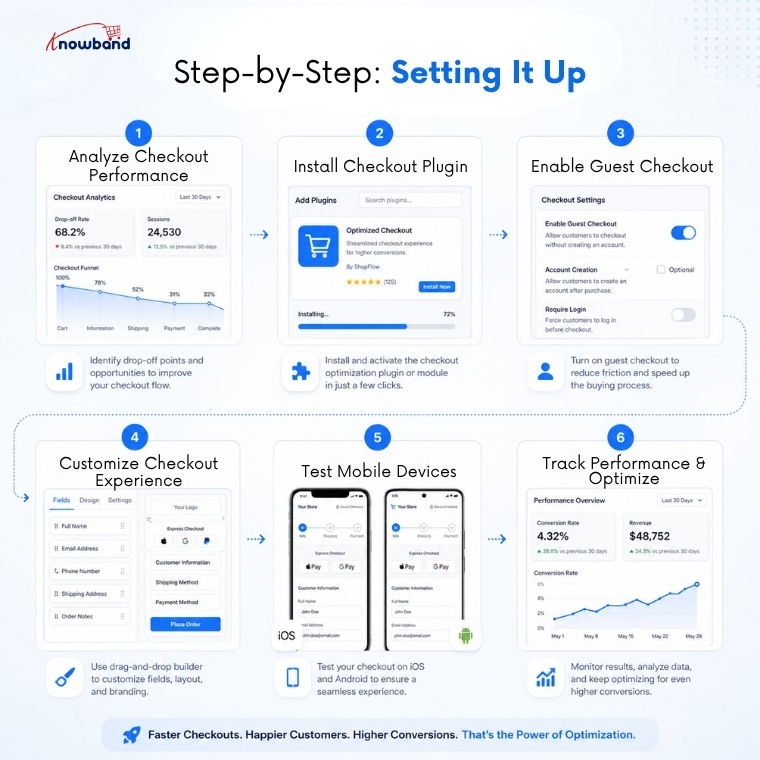
- Check where customers are dropping off. Open your analytics and identify which checkout step has the highest exit rate. This gives you a baseline to measure improvement against.
- Install the addon via your back office. Download the module from the Knowband store, upload it through the Prestashop module manager, and activate it.
- Turn on guest checkout. Go to the addon settings and enable guest purchases. This single change often produces the most immediate drop in abandonment.
- Adjust the layout to match your store. Rearrange the billing, shipping, and payment sections and apply your store’s colour scheme so the checkout feels consistent with the rest of your site.
- Test on real mobile devices. Check the checkout on both iOS and Android phones before pushing it to production. Pay attention to form usability and button placement on smaller screens.
- Track abandonment rates after launch. Compare the numbers from before and after the switch to see the actual impact on completed orders.
Frequently Asked Questions
Q: What is Prestashop’s one-page checkout?
This Knowband Prestashop One Page Checkout Module consolidates all checkout steps, address, shipping, payment, and order review onto a single page so customers can complete their purchase faster and with less friction. Furthermore, this Prestashop one-page checkout module implements this automatically without custom coding.
Q: Does a quick checkout addon improve conversions?
Yes. Reducing the number of steps and removing forced registration are two of the highest-impact changes a store can make. Most merchants see a measurable drop in abandonment rates within the first few weeks after deployment.
Q: Can I enable guest checkout with this solution?
Yes, the One Page Checkout Module by Knowband includes a dedicated guest checkout button. Moreover, customers can complete their purchase without creating an account, which really improves conversion for first-time visitors.
Q: Is the Prestashop simplified checkout addon mobile-friendly?
Yes. The addon is fully responsive and tested across modern mobile browsers, ensuring a consistent experience on both smartphones and tablets.
Q: Do I need technical skills to configure it?
No. The Prestashop One Page Checkout Addon is designed for store owners without developer experience. Installation and configuration happen entirely within the Prestashop back office, and the interface is straightforward.
Q: How does a Prestashop fast checkout addon differ from standard checkout optimisation?
Standard optimisations like cleaning up page design or reducing form fields offer incremental gains. A fast checkout addon restructures the entire flow into one page, producing significantly larger improvements in completion rates.
Take Action on Checkout Abandonment Today
Checkout optimisation can make or break an e-commerce store. A long, drawn-out checkout process drives potential customers away, regardless of how good your products are.
There are several ways to tackle this, but dedicated modules like the Knowband Prestashop One Page Checkout tend to be among the more practical and dependable options out there. Moreover, condensing the checkout into a single page cuts down on unnecessary friction, makes the experience smoother for shoppers, and brings your conversion numbers up. If cutting cart abandonment and getting more out of your store matters to you, a Prestashop one-page checkout solution is worth seriously considering.


)