
Four attributes on one product. Nineteen values on the first one, eight, eight and three. That equates to 3,648 variants of an item, and it’s no mere hypothetical: a merchant reported exactly this on PrestaShop’s issue tracker, across 30 products and over 100,000 database rows.
Their product pages timed out, and the back office returned a blank white screen.
Nothing had broken. The catalogue was functioning precisely as built, at a scale no one had optimised for it.
The problem many owners learn when it’s too late: PrestaShop product combinations are exponents, not sums. Ten values in one group and ten in another give you a hundred variants to price, stock and photograph, not twenty. Sound PrestaShop product combination management starts there.
1.0 PrestaShop attributes and combinations: what is the difference?
Two terms get mixed up constantly, and the difference decides how you build your catalogue.
PrestaShop product attributes are the things a customer picks. Size, colour, storage capacity. A feature is descriptive text that sits on the page and cannot be selected: weight, material, country of origin. PrestaShop’s own documentation puts it neatly: a customer can buy an iPad variation based on colour and disk space, but not based on weight.
Get this wrong, and it costs you either way. Treat a feature as an attribute, and you generate hundreds of variants nobody will ever choose between, each carrying rows in five tables. The reverse is worse: customers cannot buy the version they came for.
Three layers make up the structure. An attribute group such as Size holds values such as Small and Medium, and a combination is one pairing across every group. In the backend, that is a row in product_attribute, carrying its own reference, price adjustment, weight and stock.
2.0 Why do PrestaShop product combinations multiply so quickly?
The full Cartesian product – each value from each group taken together with each value from each other group – is what the PrestaShop combination generator produces. Your count of PrestaShop product variants is those numbers multiplied, not added.
Watch how quickly that gets away from you.
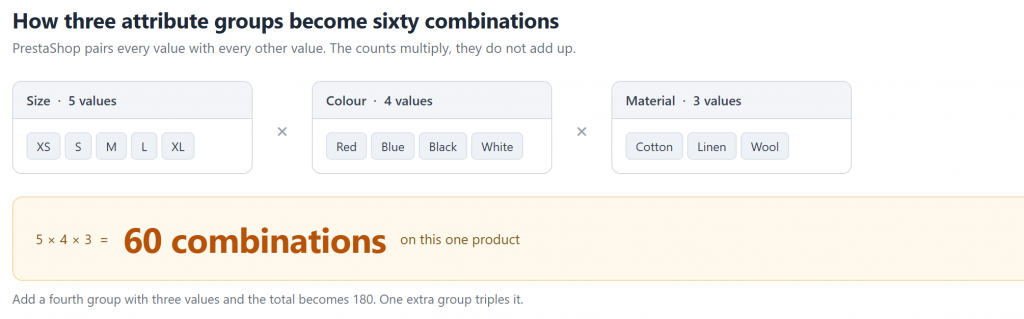
Three groups, sixty variants. A fourth group of three values would take it to 180.
| Attribute groups | Values in each | Combinations created |
| 2 (Size, Colour) | 5 and 4 | 20 |
| 3 (Size, Colour, Material) | 5, 4 and 3 | 60 |
| 4 (Size, Colour, Material, Finish) | 5, 4, 3 and 3 | 180 |
| 4 (as reported in issue #12915) | 19, 8, 8 and 3 | 3,648 |
Add one more group of three values and your total triples. Not plus three: times three. That single point catches out more merchants than anything else in PrestaShop combination management.
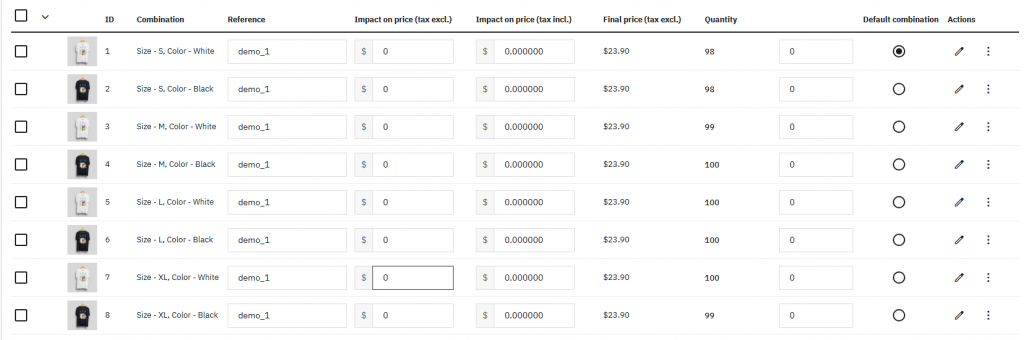
Worth knowing before you click Generate: the platform imposes no upper limit. The generator is recursive, yielding combinations one at a time, with no maximum defined anywhere in the class.
3.0 What the database does when you generate combinations
A single combination is never a single row. Far from it. That is the detail people miss when they look at a bloated catalogue and wonder where the size came from.
Generate one combination, and PrestaShop writes to five separate tables:
- product_attribute holds the combination itself, with its reference and price impact.
- Shop-specific pricing and stock settings go into product_attribute_shop, one row per shop.
- product_attribute_combination links the combination to its attribute values. Crucially, this is one row per attribute, so a four-attribute combination writes four rows here on its own.
- Stock lives in stock_available, again per shop.
- Finally, product_attribute_lang stores the availability labels, one row per language.
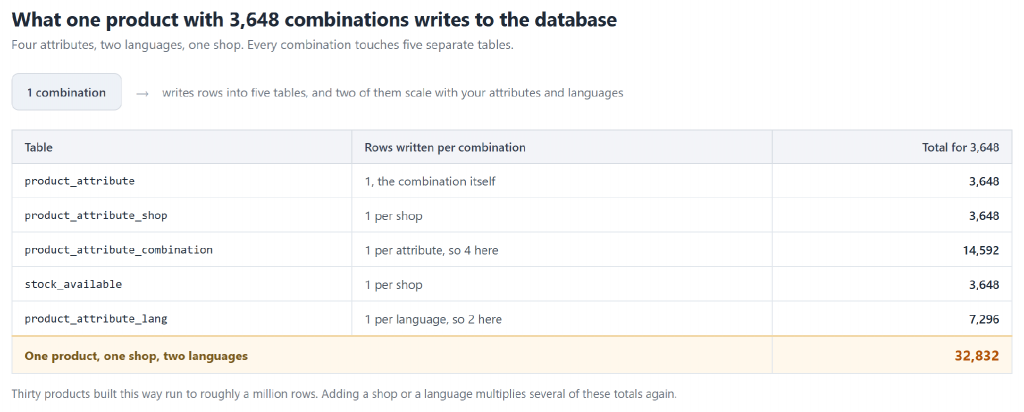
Five tables per combination, two of which scale with your attribute and language counts.
Now, perform the arithmetic on that 3,648-combination product assuming four attributes, 2 languages and 1 shop. You end up with 3,648 rows for product_attribute, another 3,648 for product_attribute_shop, 14,592 for product_attribute_combination, 3,648 for stock_available, 7,296 for product_attribute_lang. That is 32,832 rows for a single product.
Multiply by 30 products, and you approach a million rows. The merchant in that issue reported over 100,000, putting them at the conservative end.
Languages and shops multiply the total again, so three languages across two shops does not add a little overhead to PrestaShop product variant management. Several of those counts multiply outright.
4.0 PrestaShop combination performance for large catalogs
Storage is cheap, and a million rows is nothing to a database. So why did those product pages crawl?
The answer sits in the front office controller, and it is more specific than general slowness.
Open a product page as a customer, and PrestaShop calls getAttributesGroups() with no filter, narrowing it to the combination on screen. Every combination row for that product comes back. All 3,648 of them, on every page view, before the visitor has clicked a thing.
Then it gets more expensive. The controller loops through those rows and calls Product::getPriceStatic() once per combination to work out whether a specific price applies. Nearly four thousand price calculations, each running its own tax and discount logic, to render one page.
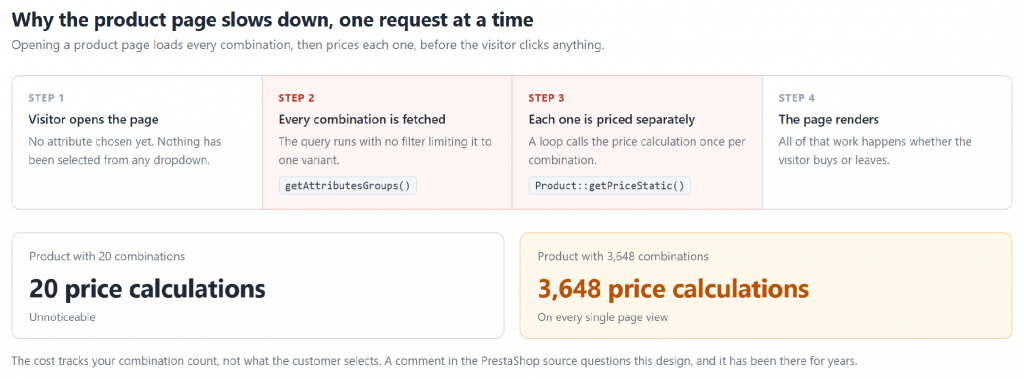
Nothing here depends on what the visitor picks. The work happens either way.
PrestaShop’s developers are aware. Sitting directly above that query in the 8.2.6 source is a comment from a core maintainer asking whether the code should only fetch the groups rather than every variant. The question has been in the codebase for years.
Two practical consequences follow from this design:
- Page load time scales with your combination count, not with what the customer actually selects. A product with 3,600 variants is slow even for a visitor who leaves immediately.
- Specific price rules make it worse, because each one adds work inside a loop that already runs thousands of times. This is the single biggest trap in PrestaShop large catalog combination management.
Worth knowing: a shop with no combinations skips the query entirely, since Combination::isFeatureActive() returns early.
5.0 How to manage thousands of product combinations in PrestaShop
5.1 Cut the attribute count before anything else
Every group you remove divides your total, so this is the change with the largest effect, and it costs nothing technically.
For each group, ask something blunt: will a customer refuse to buy if they cannot choose this? Finish, packaging type and thread count usually fail that test. Move them to features.
Drop one three-value group from that 3,648-combination product, and you are at 1,216. One decision, two-thirds of the rows gone.
5.2 Split into separate products when a variant is really a product
For genuine variations of one item, attributes are right. Once options differ enough that customers search for them separately, or you want distinct photographs and URLs, those are separate products wearing a variant costume.
Separate products index better too, since each gets its own URL and meta description. A combination gets neither.
5.3 Generate, then edit in bulk
For PrestaShop bulk combinations, the generator beats building variants by hand. Generate the full set, then delete what you do not stock, which is the practical core of PrestaShop bulk product combinations management. During generation PrestaShop switches off specific price rules and applies them in one pass at the end, so the first run is faster than it looks.
Regenerating over an existing set behaves differently. Before creating each combination, PrestaShop queries the database to check whether that attribute pairing already exists. Thousands of combinations, thousands of lookups. Hence a second run feeling far slower than the first.
5.4 When a combination is the wrong tool entirely
Cutting attribute groups raises an obvious question: what happens to the option you just removed? Sometimes it becomes a feature. Sometimes neither fits.
Engraving text, a monogram, a delivery date, an uploaded logo. None can be a combination, because a combination needs a finite list of values defined ahead of time.
These belong in a custom product field, which PrestaShop calls a customisation:
- A combination is finite, defined in advance, and carries stock. Each one costs rows across five tables.
- Open and filled in by your customer: The custom field takes up no space in your stock, costing the same for products with 3 variations as it would with 3000 of them.
The two work together. A t-shirt can carry Size and Colour as combinations while taking a printed name as a custom field, and the order line shows both.
One catch is worth knowing first. PrestaShop identifies a cart line by product and combination, so two customers ordering the same mug with different engraving would collapse into one line of quantity two. Modules solving this override Cart::updateQty, Cart::getProducts and Cart::deleteProduct, then hash the submitted values to keep the lines apart.
5.5 Two problems that only appear once an order is placed
The order stores the combination inside the product name. When an order is placed, PrestaShop does not keep a reference to the combination and look it up later. It writes the combination into the name and stores that string, so order_detail.product_name ends up holding something like Hummingbird printed t-shirt (Size: S – Color: White).
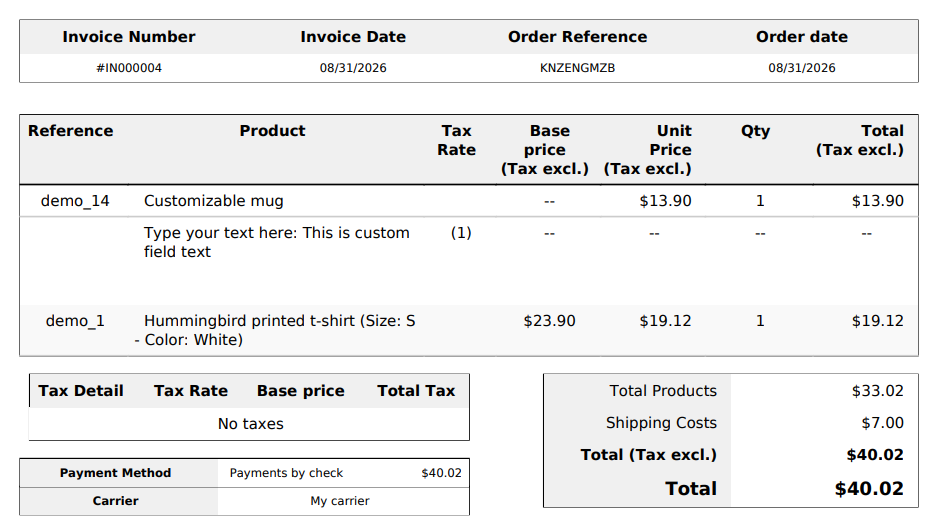
With every single attribute you set for a field, that string gets one item longer as each value and group is appended to it. Four groups produce a long tail on an already long name.
The column width is where this is the problem, and this varies by your PrestaShop version.
PrestaShop 1.7, the column width is varchar(255). 8 and 9 use MEDIUMTEXT, and it also seems to say that the varchar size for this field on 1.7 isn’t declared, and the length is not tested before the insert and is simply truncated by MySQL after 255 chars.
Nobody sees an error. The order saves, and the loss shows up later on the invoice or in the order list, where two variants can look identical because the part telling them apart is the part that got cut. Upgrading past 1.7 removes the ceiling.
The customisation text is passed on to the confirmation email as a string, and PrestaShop dynamically generates this text inside PHP with the desired markup, with the labels put within and entries delimited by <br />. The email template then echoes the value without using marked safe, and because mail templates are executed with Smarty’s escaping enabled, all those tags are transformed into entities.
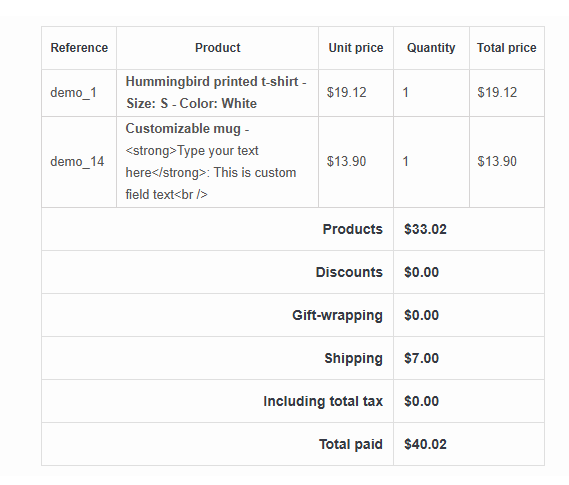
The customer reads the tags instead of seeing a bold label and a line break. Send yourself a test order with a customised product, since the same order can render correctly on the PDF invoice while the email shows raw markup.
5.6 Watch what specific prices are doing
Every specific price rule adds work inside that per-combination loop, which is why a handful of rules costs nothing on a small catalogue and becomes the whole problem on a large one. Recall the merchant in issue #12915: a different custom price on each of 3,600 variants.
Where one price difference applies to a whole group, use the combination price impact field rather than a specific price rule. It sits on the combination row itself and costs nothing extra to read.
6.0 What changed between PrestaShop 1.7 and 9?
Plenty, and the differences matter if you are following an older tutorial.
In PrestaShop 9, the legacy product page is gone. What replaced it- the rebuilt page introduced during 1.7 and refined through the 8.x series- is now the only option available to you. The 9.0 developer notes confirm the old page cannot be reached at all. So every screenshot in a tutorial written before this shows an interface you do not have.
Module authors have more to check. Every hook tied to the old product page went with it in 9.0: the actionAdminProductsController family. Relying on one for combination handling? That module needs rewriting.
Two data changes catch people out as well. Gone from Product::getProductProperties is attribute_price, and features are no longer included by default in getProductsProperties. Both fail silently.
On performance, there is recent good news. PrestaShop 9.1 shipped what its release notes call a significant cart performance improvement for shops with many product combinations. Running a large variant catalogue on 9.0? That alone justifies the upgrade.
One schema change matters if you are still on 1.7. The order_detail.product_name column was varchar(255) there and is MEDIUMTEXT on 8 and 9, so upgrading removes the silent truncation described above.
The fundamental behaviour has not changed, though. Combinations remain a Cartesian product, uncapped, spread across the same five tables, and counting before you generate matters as much on 9 as it did on 1.7.
7.0 A practical order to work in
Faced with a catalogue that has grown unwieldy, work through these in order. The short answer to how to handle product variants at scale in PrestaShop.
- Count first. Multiply your attribute values together before clicking Generate. Past a few hundred on one product, stop and reconsider.
- Could any attribute group be a feature instead, or an open custom field?
- Which variants deserve their own product page? Anything you want found separately in search.
- Check specific price rules on high-variant products, replacing what you can with the combination price impact field.
- Place a test order on a product with several attributes and a customization, then read the order line and the confirmation email. Long names truncate on 1.7, and the email escapes its own markup.
- Running PrestaShop 9.0 with a large variant catalogue? Upgrade to 9.1 for the cart performance work.
8.0 The short version
Combinations multiply, and that multiplication hits the database faster than most merchants expect. Five tables per combination. One four-attribute product with a few thousand variants can hold 30,000 rows.
Where performance suffers is the product page, not storage. PrestaShop loads every combination and prices each one individually, on every view, whether or not the visitor opens the dropdown.
The most effective fix stays the simplest. Fewer attribute groups mean fewer combinations exponentially, so do the multiplication before you generate anything.
Thanks for reading.
If you have questions or need assistance with your website performance or migration, our experts are here to help. Contact the Knowband team at [email protected] today for reliable ecommerce plugins tailored to your eCommerce needs.

