
Customers don’t stop having questions just because they’re shopping on a phone. They might want to learn more about the availability of a certain product, inquire about a certain feature of a product, get information on the status of their order, and so on. The integration of a chatbot into the PrestaShop eCommerce Mobile App provides customers with one more option for receiving necessary assistance without leaving the platform of shopping. Via PrestaShop Mobile App Builder, the chatbot becomes a part of the mobile application along with such functionalities as product search, order tracking, notifications, and checkout. The underlying mobile app already includes support for Android and iOS platforms, product catalog synchronization, different payment and delivery methods, and order tracking.
The result is not simply another chat window. A properly configured assistant inside a PrestaShop mobile app solution by Knowband can become part of the shopping journey, helping customers understand products before purchase and find relevant support after an order.
Why an AI assistant makes sense inside a PrestaShop mobile app
The share of mobile commerce in overall e-commerce transactions is rapidly increasing. According to Statista, mobile commerce revenue was estimated at $2.5 trillion worldwide in 2025.
That creates a practical challenge for store owners. A mobile shopper has less screen space and often wants an answer without navigating through several pages or waiting for a support response.
A conversational assistant can shorten that path. Rather than going through each category, product description, FAQ, or order separately, the user simply explains what they are seeking in natural language.
For instance, a customer who is shopping for a product can inquire about its availability or features. A user who has bought a product can similarly make an inquiry using the same chat-based interface.
The approach also fits the broader movement toward AI-assisted retail. Salesforce reported that retail AI and agent actions grew at an average monthly rate of 128% during the first half of 2025, while 94% of customers who observed an AI agent in a chat window went on to engage with it.
The numbers don’t guarantee a particular result for an individual store. They do show why AI-assisted interactions are becoming relevant to commerce teams.
What the chatbot can add to the PrestaShop shopping journey
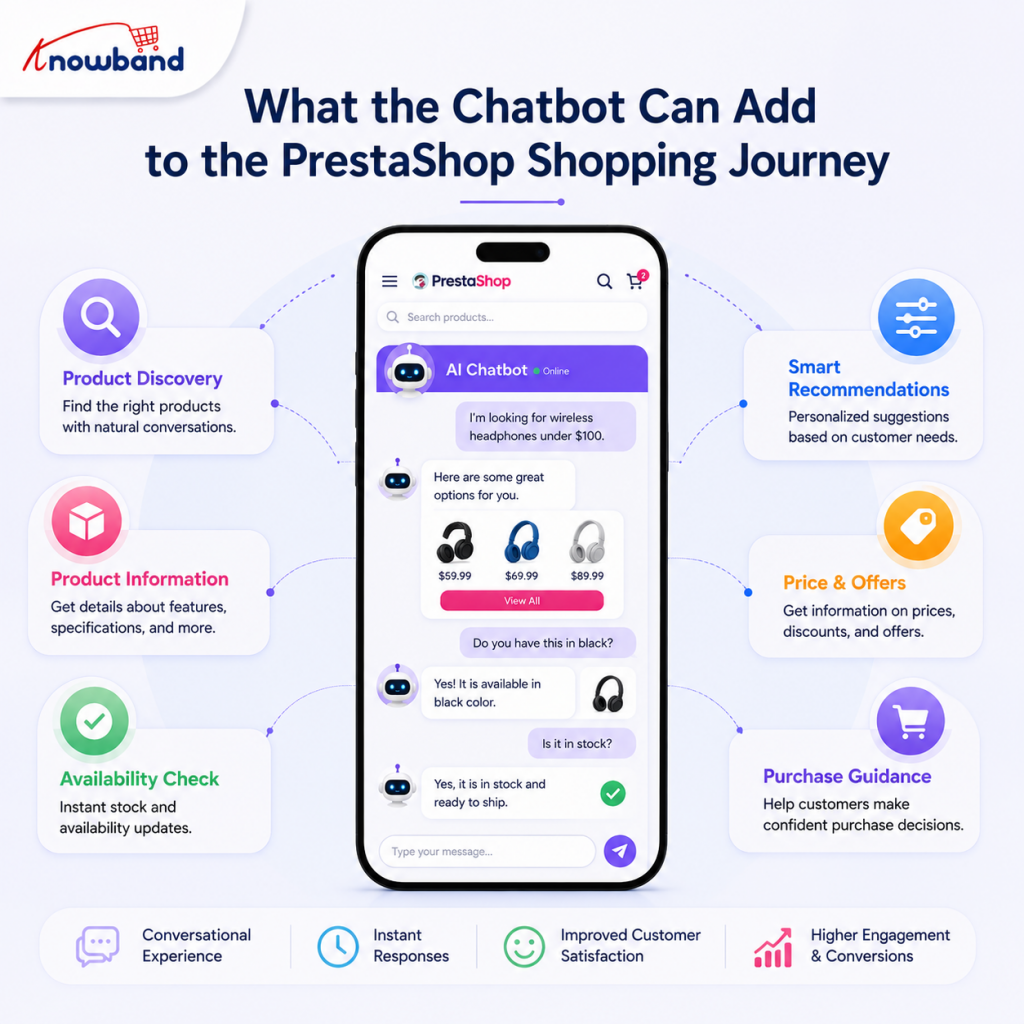
The current PrestaShop Mobile App provides shoppers with access to the following: categories, products, search, filtering, accounts, cart, and orders. It is also clear from the documentation that customers can browse through products using filters and sorting and see their order details from the account page.
The chatbot adds a conversational layer over that shopping experience. Knowband has built this capability directly into the mobile app rather than as a separate tool.
Handling product queries before checkout
One of the most obvious use cases involves product discovery. Customers don’t usually know the exact name of the product they are searching for. They may describe a requirement instead.
The buyer may need some clarification about a certain kind of product and not want to buy it without additional assistance. Instead of opening multiple product pages manually, the buyer can ask the assistant for advice.
It becomes especially relevant in case a store has a large variety of products. The regular search function will be helpful for customers who already know what products they would like to buy, and conversational AI will provide an alternative for people with less concrete needs.
The app already features product search based on text input, categories, filters, sorting, product descriptions, and a wish list. The chatbot can sit alongside these established discovery tools rather than replacing them.
Supporting post-purchase questions
The second major use case is order support.
The mobile app documentation already includes order tracking, account information, order details, and automated order-status notifications.
That matters because order-related questions often occur after the customer has already completed the purchase. The conversational interface enables the customer to contact the assistant using a different approach while staying in the app.
The app’s notification system can automatically update the customer about new orders and the status of their delivery.
These tools provide a more interconnected system of customer assistance. Notifications can proactively communicate an update, while the chatbot provides a conversational route when the customer wants additional information.
How to enable the AI chatbot in the mobile app
For a store using the PrestaShop Mobile App Builder, the chatbot is configured as part of the mobile app setup, but the PrestaShop AI Chatbot module must be purchased separately to enable the chatbot functionality in the app.
The supplied implementation documentation identifies an Enable AI Chatbot setting within the mobile app’s general settings. Enabling this option activates the AI chatbot functionality in the app when the required AI Chatbot module is installed and configured.
The practical workflow is straightforward:
- Install and configure the mobile app module on the PrestaShop store.
- Purchase, install, and configure the required AI Chatbot module.
- Configure the required mobile app settings.
- Enable the AI chatbot option.
- Configure the associated AI chatbot integration according to the available setup.
- Test product-related and support-related conversations before releasing the app.
The exact AI configuration should be checked against the current chatbot implementation supplied with the module. Avoid assuming that every AI service or setting available in other chatbot products will be present here.
The reference implementation documents support integrations with AI models including OpenAI ChatGPT, Google Gemini, Claude, and DeepSeek.
That model choice gives merchants flexibility when configuring the conversational experience, while the mobile app remains the customer’s primary shopping environment.
Where the chatbot fits alongside existing support options
A chatbot is not necessarily the only source of assistance in the mobile store.
The Mobile App for PrestaShop already supports a WhatsApp chat feature, allowing shoppers to contact the seller directly from the application.
That creates a useful distinction between automated and direct assistance.
A customer with a straightforward product or shopping question can use the chatbot. A more unusual issue may still require direct communication with the store team through the available support channel.
This is particularly useful for stores where support requests vary widely. Automated assistance can handle routine interactions while human communication remains available for cases that require personal attention.
Make product information easier for the chatbot to use
The quality of conversational answers depends heavily on the information available to the underlying AI system.
Store owners should review the information customers commonly need before enabling the feature. Product descriptions must be clear, accurate, and specific. It would not be possible for a chatbot to cover up missing attributes of the products in the catalog.
The same principle applies to support content. Shipping information, product details, and store policies should be maintained consistently wherever customers are expected to find them.
This is one reason the existing mobile app structure matters. The app already synchronizes store information and supports product, category, account, and order functionality. The product documentation describes real-time synchronization between the website and the Mobile App for PrestaShop, keeping the PrestaShop eCommerce Mobile App data consistent across platforms.
Good underlying store data gives both conventional navigation and conversational assistance a stronger foundation.
A practical example for a PrestaShop retailer
Consider a fashion store with hundreds of products.
A customer opens the PrestaShop eCommerce Mobile App and wants help finding a suitable item. Instead of moving through multiple categories, the customer starts a conversation with the assistant and asks about a product requirement.
The shopper may continue to browse through the recommended product descriptions, go to the particular product page, and move on to making a purchase.
In the future, the same customer will come back to the app to track the order status after making the purchase. As order status tracking is also available in the app, the post-purchase phase is still within the mobile shopping context.
The value here is not that the chatbot replaces every existing feature. The value comes from reducing the amount of navigation a customer needs for common questions.
Don’t overlook the rest of the mobile support experience
An AI assistant works perfectly well when the app experience itself is already good.
The PrestaShop Mobile App Builder has some features like a customizable home screen, product filtering, list view and grid view options, multiple login options, push notifications, an easy checkout process, and an order tracking feature.
The app also comes with auto-notifications for order creation, order status changes, and abandoned cart. Store administrators can configure notification titles and messages from the backend.
The above-listed features address various stages of the customer journey.
Customers will find a product through the home screen, use searching or browsing options in the catalog, receive explanations from the chatbot, check out, and eventually receive order status notifications. It gets much easier to create a seamless experience if every feature plays its role.
For merchants, this also means the chatbot shouldn’t become an excuse to neglect navigation, product data, checkout, or notifications.
What should store owners test before launch?
Before making the chatbot available to every app user, test it from the customer’s perspective.
Start with questions that are directly connected to your catalog. Check whether the assistant provides useful responses to normal product queries and whether customers can understand the answer without additional explanation.
Next, test support scenarios. Include common order-related questions and verify how the conversational experience works alongside the app’s existing account and order functions.
Also test unsuccessful or ambiguous requests. A chatbot should not be treated as an unrestricted source of store information. If the required information is unavailable or a request falls outside the documented functionality, the customer should have another support route.
Finally, test the chatbot on both major mobile platforms supported by your app. Knowband’s PrestaShop eCommerce Mobile App confirms Android and iOS support, while the module itself is designed around a Flutter-based mobile application framework.
Common implementation mistakes to avoid
One common mistake is treating the chatbot as a standalone marketing feature. The better approach is to decide which customer problems it should address inside the app.
Another is relying on vague product information. A conversational interface can make information easier to access, but it doesn’t automatically make incomplete information more accurate.
Don’t hide traditional navigation, either. Some customers prefer categories, filters, and direct product search. The mobile app already supports these methods, including layered navigation and product filtering.
Finally, avoid presenting AI assistance as a replacement for every human support interaction. Some requests are naturally better handled by a store representative, particularly when the customer needs individual attention.
Building a more useful support layer into mobile commerce
In terms of the PrestaShop Mobile App Maker, integration of the conversational assistance makes sense if it helps complement the app’s functionality.
It all comes down to a simple task: enabling customers to proceed from the stage of confusion to action mode with minimum friction.
Shoppers have to be able to discover products, know what they are buying, experience a smooth checkout process, and track their orders without switching to other channels. The chatbot can help to accomplish this goal with conversational assistance.
The approach also leaves room for existing communication tools. WhatsApp support, account pages, order tracking, and notifications remain useful parts of the overall experience.
For stores that serve customers across different regions, the Knowband mobile app’s existing multi-language and RTL capabilities can also support a broader mobile audience.
Final thoughts
A chatbot can make a PrestaShop eCommerce mobile application much more convenient during two critical moments of the customer journey: while choosing the product and while placing and tracking the order.
The strongest implementation isn’t about adding chat for its own sake. Product data, mobile navigation, order information, notifications, checkout, and support channels should work together so customers can move through the store without unnecessary friction.
For businesses that are considering the use of PrestaShop Mobile App Maker, the PrestaShop Mobile App Builder is the one that offers the base for mobile shopping and the one where the AI chatbot feature has been included recently.
If you are going to integrate this feature into your store, you can consider exploring the PrestaShop Mobile App to learn about the different mobile app features.
For more such reads, you can visit:


