
Even if your products are good, prices are competitive, and your website looks nice, your OpenCart store can still struggle to appear in Google. The issue is frequently hidden in the technical setup, product content, duplicate URLs, poor metadata, or pages that search engines can’t easily understand.
An OpenCart SEO Manager will help you spot these issues systematically, but the real work starts with understanding what is preventing your pages from performing. A practical OpenCart store SEO management solution can make that process easier by bringing page-level audits and technical checks into the administration area.
Fortunately, ranking issues can frequently be detected. Instead of changing keywords randomly, first try to see if Google can crawl your store, understand your pages, and see a clear reason to rank them.
1. Your important pages may not be getting indexed
Firstly, confirm Google can find and index the pages that you want to rank before you get worried about the rankings.
If a product is not indexed in the search engine, it won’t show up in organic search. Ecommerce stores are particularly vulnerable because filters, parameters, discontinued products, duplicate URLs, and poorly linked catalog pages can create a much larger URL set than the owner realizes.
Open Google Search Console and inspect several important URLs individually. Compare what you expect Google to index with what is actually indexed.
Pay particular attention to:
- Important products missing from Google’s index
- Category pages that aren’t appearing
- Pages accidentally blocked from crawling
- URLs with indexing exclusions
- Pages that exist but have no useful internal path leading to them
An OpenCart SEO Plugin can help with some of the administrative work around these issues, but it shouldn’t replace checking actual indexation data in Search Console.
2. Your product pages are too similar
One of the easiest SEO mistakes to make in ecommerce is copying the manufacturer’s description and using it across every store selling the same product.
Search engines can understand that multiple pages describe the same type of item. Your opportunity is to provide information that makes your page more useful and more specific.
Suppose that you have an online shop named OpenCart, where you sell office chairs. An ergonomic backrest and adjustable height may be described in the Product Description copied from the manufacturer. The chair specifications are better, along with recommended height, material, weight capacity, adjustment mechanism, and warranty, as well as appropriate applications.
The difference isn’t word-for-word length. People who are considering purchasing the product should have the answers addressed on the page.
Recent ecommerce audit guidance also identifies thin product copy and copied supplier descriptions as recurring areas worth checking.
3. Your titles and descriptions don’t match the page
A generic title such as “Products | My Store” gives Google and searchers very little information.
Every key page should have a title that is clear and informative about the information that will be on the page. Category pages and product pages should not all use the same template with only a minor variation.
The same thing also applies to the meta title and meta description. Google explains that snippets are primarily generated from page content, but in cases where the meta description is a better summary of the page, it will be used to generate snippets. Google also encourages using descriptions that reflect your site, but are different on each page.
For a large OpenCart catalog, manually writing every description may not be practical. Programmatic generation can help when the underlying product data is accurate, but generated text still needs quality control.
4. Your URLs are messy or changing too often
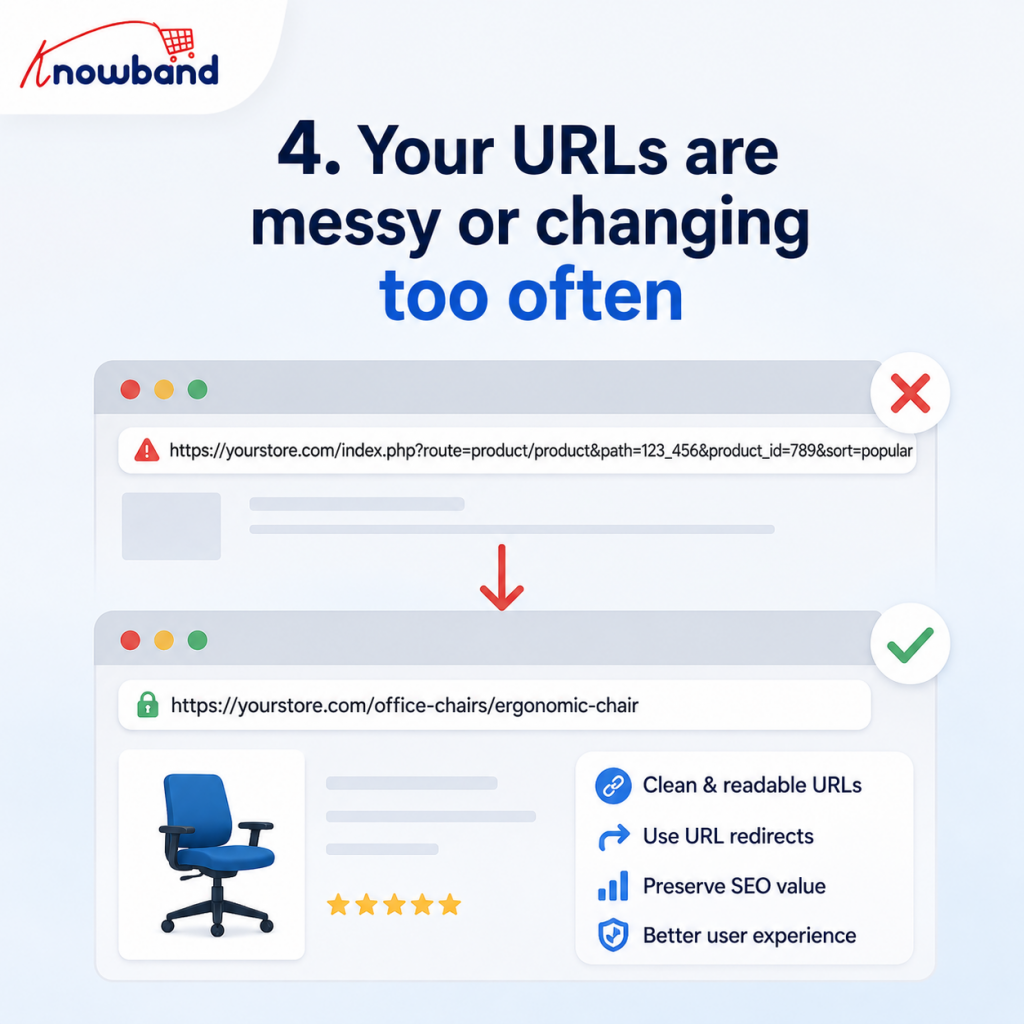
A good URL is easy to read and does not need to be deciphered by a number of parameters.
Issues with the URL structure can trouble OpenCart stores during redesigns, migrations, or SEO projects. A product that previously lived at one address may suddenly have a different URL, while Google, external websites, and internal links still reference the old one.
That creates a technical problem rather than a keyword problem.
When URLs genuinely need to change, map old addresses to the most relevant new destinations. Don’t send every old product URL to the homepage simply because the product no longer exists.
Use URL redirects deliberately, particularly for pages that previously attracted organic traffic or external links.
5. Your category pages aren’t doing enough work
Many ecommerce sites focus heavily on individual products and neglect category pages.
A category page can be used to target a broader search intent and assist users in getting to the right product. But if there is just a heading, a product grid, and the bare minimum useful context, then there might be insufficient information for search engines to understand.
Consider a category for “running shoes.” The page could explain the types of running shoes available, relevant characteristics, intended uses, and how the products differ. Links to meaningful subcategories and products then create a clearer information hierarchy.
The content shouldn’t become a long block of SEO copy placed above the products. A concise introduction followed by useful supporting information is often more practical for shoppers.
6. You have duplicate URLs competing with each other
Duplicate content problems in ecommerce don’t always come from deliberately copying text.
Filters, sorting options, product variants, tracking parameters, and alternative URL structures can generate multiple addresses that point to substantially similar content. Search engines then have to determine which version is the preferred one.
Audit your store for situations where:
- Several URLs show essentially the same page
- Filter combinations create indexable pages unnecessarily
- Product URLs exist under multiple paths
- Similar pages use inconsistent canonical signals
- Old URLs remain accessible after a migration
A canonical URL helps communicate which version should be treated as the preferred URL. It is not a universal solution for every duplicate-page situation, so the underlying URL structure still needs attention.
Recent ecommerce audit frameworks specifically highlight filtered URLs, duplicate content, and indexation as areas that deserve dedicated review.
7. Your store has broken links and abandoned URLs
A store with hundreds or thousands of products will eventually accumulate URLs that no longer work.
Some 404 errors are perfectly normal. A discontinued product with no suitable replacement may have no reason to redirect anywhere.
The problem is when valuable pages disappear, and visitors or search engines continue to encounter them.
Check which broken URLs are receiving traffic or are linked from other pages. If an old product has been replaced by a newer version, redirecting the old URL to that relevant replacement makes sense. If there is no equivalent destination, don’t create a misleading redirect just to eliminate an error report.
An OpenCart SEO Audit Manager can be useful here because its confirmed functionality includes 404 tracking, duplicate URL detection, and a redirect manager for creating 301 redirects.
8. Your sitemap and crawler directives don’t reflect your store
A sitemap is used to assist search engines in locating the URLs that you actually intend to be indexed.
Make sure your XML sitemap includes valuable, up-to-date URLs while avoiding the inclusion of unwanted pages in search. Review it after large product imports, catalog cleanup, URL migrations, or changes to your store structure.
Then inspect robots.txt separately. A crawler directive may exclude sections of your site from being accessed by search engines, which, if accidentally created, can create an SEO issue that isn’t visible from the frontend itself.
The OpenCart SEO Audit Manager product documentation confirms functionality for XML sitemap generation and a robots.txt editor, which can make these controls easier to manage from the store administration area.
9. Your internal links don’t help Google understand the catalog
An ecommerce site can contain thousands of pages but still have a weak internal structure.
Consider the ways in which a product is discovered. Users and crawlers could struggle to access the product if the only way to the product is through an overly complex filter or an unusual page.
Good internal linking establishes logical connections between categories, subcategories, products, and supporting content.
For instance, if you have a coffee machine category page, it could contain links for grinder category pages, individual machines, maintenance instructions, and accessories. Those relationships, in turn, make it easier for people to navigate the store and provide search engines with extra context.
Review important products that receive impressions but have few internal links. Improving their placement within the site’s navigation can be more valuable than adding another paragraph of generic product copy.
10. Your images are slowing down important pages
Large ecommerce images can make attractive stores frustrating to use.
Product photography often has to remain detailed, but the browser doesn’t necessarily need to download enormous original files for every visitor. Check image dimensions, compression, modern formats where appropriate, lazy loading, and how many assets are loaded immediately.
Then measure the result instead of guessing.
Google’s current guidance advises a good Core Web Vitals score and has thresholds of 2.5 seconds for LCP, 200 milliseconds for INP, and 0.1 for CLS. Google also states that having good Core Web Vitals doesn’t necessarily mean a page will rank high.
The aim should not be to get a 100% score. Resolve performance issues that lead to a substandard shopping experience, especially on mobile.
11. Your structured data doesn’t match what visitors see
Structured data can be useful for product pages that include price, availability, reviews, product details, etc., that may be able to be parsed by search engines.
The mistake is treating markup as an opportunity to tell Google something that isn’t actually visible or accurate on the page.
Review your implementation after changing themes, installing extensions, modifying product templates, or changing review systems. Structured data should represent the page rather than create a separate version of it for search engines.
If your store has custom OpenCart development, ask the developer to check structured data after significant template changes. SEO problems can appear after a seemingly unrelated front-end update.
12. Your page headings are confusing
A page can look perfectly normal to a shopper while having a poor HTML heading hierarchy.
Product pages should clearly identify the product. Category pages should identify the category. Supporting sections can then use appropriate subordinate headings.
Do not put on headings because an SEO audit states that you need to include them. A page with meaningful sections is useful; a page with keyword-stuffed headings isn’t.
Also check whether the visible heading actually matches the page’s purpose. A product page titled “Best Shoes Online” when the product is a specific hiking boot creates ambiguity.
13. Your SEO score is high, but traffic is still low
An SEO score is a diagnostic device, not a ranking guarantee.
Even a page can pass through technical checks and not get organic traffic if the query that is targeted is incorrect, there is better information from a competitor, there isn’t much search interest, or simply the page doesn’t meet the intent of the query.
This is where an OpenCart SEO Analyzer can come in handy in the bigger picture. Obviously, the page-level scoring can assist you in finding these issues, but you need to use the findings in conjunction with actual search performance and commercial data.
Look at impressions, clicks, queries, conversions, and landing-page behavior. If a page has strong technical health but no impressions, investigate demand and indexation. If it has impressions but few clicks, examine the search result presentation and intent match.
14. You are making changes without measuring the result
SEO work becomes much easier to manage when you establish a baseline.
Before making major changes, record the current performance of important pages. Once the changes have had sufficient time to provide meaningful data, compare the results.
Google Search Console can provide queries, impressions, clicks, and search performance. Google Analytics 4 can include data on what they do after they reach you organically.
Your SEO score might have gone up, but the question you need to ask yourself is, “Did my SEO score actually improve? Inquire if any of the pages that were enhanced were more easily found, gained additional search traffic, or resulted in improved business results.
Using an OpenCart SEO Manager as an audit workflow
It is easy to see how things can become rather cumbersome when an OpenCart store has hundreds of pages to review for each title, description, URL, redirect, and technical setting.
The product documentation states that on page level the OpenCart SEO Audit Manager also scores the SEO and readability from 0 to 10, offers a dashboard showing a score for the store, has score history and trend charts, detects duplicate URLs, monitors redirects, manages sitemaps, provides social metadata, generates metadata using AI and has integrations with Google Analytics 4, Google Search Console, and PageSpeed Insights.
That makes the tool more useful as an ongoing audit workflow than as a simple score generator. You can identify pages that need attention, make changes, and then use the available reporting to monitor the state of the store over time.
The ChatGPT-assisted metadata feature can also reduce repetitive writing work for large catalogs. Still, generated titles and descriptions should be reviewed for accuracy, product-specific information, and search intent before publication.
A practical OpenCart SEO troubleshooting order
If your store isn’t ranking, don’t try to fix everything simultaneously.
Start with the pages that matter commercially and work through the problems in an order that prevents wasted effort:
- Confirm indexation. Make sure important pages are accessible and eligible to appear in search.
- Check URLs and redirects. Look for broken, duplicate, or unexpectedly changed addresses.
- Review titles, descriptions, headings, and product copy. Make sure every important page has a distinct purpose.
- Inspect internal navigation. Confirm valuable pages are easy to reach through relevant links.
- Review sitemap and crawler directives. Make sure discovery and access controls agree with your SEO goals.
- Test performance. Investigate slow templates, oversized images, and scripts affecting important pages.
- Measure the outcome. Compare Search Console and analytics data before deciding whether the change worked.
This order matters. There’s little value in spending hours rewriting a product description if Google isn’t indexing the product URL in the first place.
Conclusion: Fix the reason, not just the symptom
When an OpenCart store isn’t ranking, the answer is rarely one missing keyword. Ranking problems can come from indexation, duplicate URLs, weak product content, poor internal architecture, broken redirects, slow pages, or metadata that doesn’t accurately represent the page.
An OpenCart SEO Manager can help turn those issues into a repeatable audit process, but the goal should always be better pages and a cleaner store architecture, not a higher software score.
For stores that need a centralized way to inspect and manage these issues, the OpenCart SEO Audit Manager provides page-level analysis alongside tools for redirects, sitemaps, metadata, 404 tracking, and SEO monitoring.
If you’re unsure where your ranking problems begin, start with your most valuable product and category pages, audit them from crawling through content and performance, and use what you find to guide the next fixes. That approach gives you a much clearer SEO roadmap than changing keywords and waiting for rankings to move.

