
Every morning you log in, delete a handful of accounts with names like jjejXXNzPyVcKCH, and clear another pile of gibberish contact-form messages. Where do they all keep coming from?
That junk is not a rounding error. Radware’s 2026 report found malicious bots accounted for 43% of e-commerce traffic during the 2025 holiday season, up from 31% a year earlier. A PrestaShop Spam Protection Module earns its place because that bot traffic now scales faster than any admin can clean manually.
Adding real spam protection for PrestaShop stores moves the work from cleanup to prevention. Instead of deleting fake accounts after the fact, you block the submission before it ever writes to your database.
What a PrestaShop Spam Protection Module Actually Blocks
Spam is not one problem. It is four overlapping ones, and each needs its own control. The following sections explain how each spam threat aligns with the controls designed to prevent it.
| What you see in the admin | What’s really happening | Control that stops it |
| Fake registrations | Bots auto-filling the signup form | Honeypot field + CAPTCHA |
| Contact & newsletter junk | Scripts blasting every public form | Server-side CAPTCHA verification |
| Ghost carts skewing stats | GET-based cart manipulation | Fake-cart protection |
| Repeated admin login hits | Password guessing at scale | Brute-force protection |
A single-purpose plugin only covers one row of that table. Knowband is one vendor building all four into a single module, the PrestaShop Security Module, which means the honeypot field, CAPTCHA verification, cart filtering, and brute-force protection stay in sync instead of fighting each other across three separate extensions.
Why Fake Registrations Drain Your Team’s Time
Fake account creation is rarely random. Attackers use your signup form to validate stolen email lists, and mail providers start flagging your server when those confirmation emails bounce.
One PrestaShop merchant described exactly this on GitHub: a warning from Microsoft’s abuse team that continued spam registrations would get the sending server blocked. Form spam is not cosmetic; it quietly threatens deliverability for your real customers too.
A honeypot handles most of it silently. The PrestaShop Advanced Security Module adds an invisible field genuine visitors never see, and any bot that dutifully fills every field gets rejected before an account is written.
How a Firewall and Honeypot Stop Bots Before Checkout
Form-level tricks catch obvious bots, but smarter traffic needs judging earlier. A PrestaShop Firewall Module inspects incoming GET, POST, and cookie data for known SQL-injection and cross-site-scripting patterns, returning a 403 before the request reaches your store’s own code.
Reputation filtering adds a second early layer. By checking a visitor’s IP reputation against a global blacklist on page load, the store flags known harvesters and comment spammers before they ever touch a form.
Together, these narrow the window credential-stuffing scripts depend on. Reused-password runs, and rapid guessing attempts get slowed or dropped before they build any momentum.
Choosing a PrestaShop Spam Protection Module That Covers Every Form
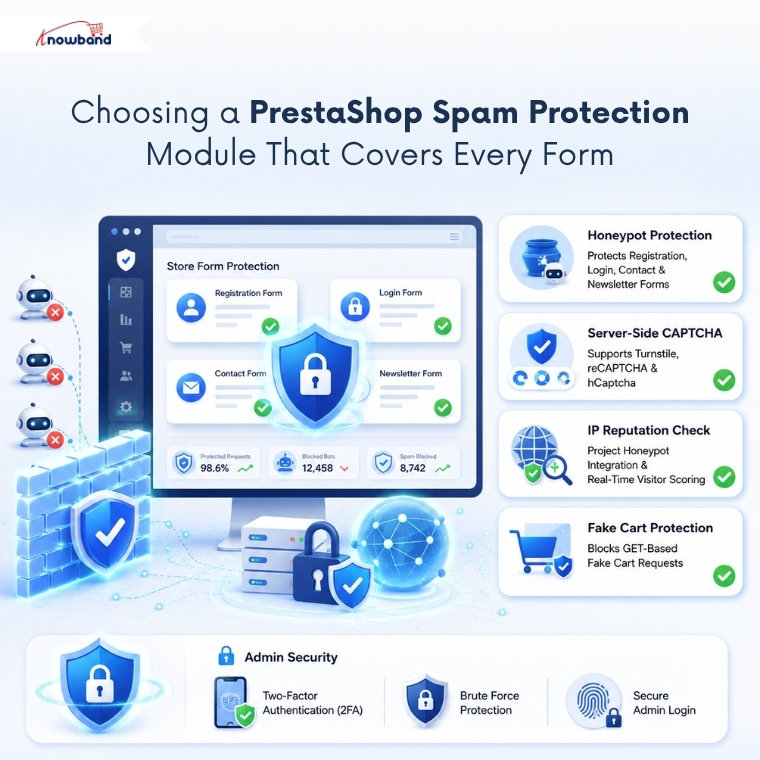
Once the problem is framed that way, Knowband’s PrestaShop Advanced Security Manager is a clean fit. Rather than stacking a separate CAPTCHA plugin, a firewall extension, and a login limiter, it consolidates admin, frontend, and file-integrity controls into one back-office screen.
For the exact pain points above, four capabilities carry the load:
- A honeypot layer that shields the registration, login, contact, and newsletter forms with no theme edits.
- Server-side CAPTCHA (Cloudflare Turnstile, reCAPTCHA, or hCaptcha) that checks before the form is accepted, so it can’t be bypassed client-side.
- Project Honeypot integration that scores visitor reputation in real time, with an observer mode to watch traffic before you start blocking.
- Fake-cart protection that strips GET-based cart noise so your inventory and analytics stay accurate.
As a full PrestaShop Security Module, it also enforces 2FA and brute-force limits on the admin login; the same tool that cleans your forms hardens your back office.
Building Real Spam Protection Into Your PrestaShop Store
Bots are now close to half of storefront traffic, so treating spam as a daily chore no longer scales. A PrestaShop Spam Protection Module shifts that cost onto automation, where it belongs.
Start with the honeypot and CAPTCHA on your public forms, add reputation filtering once you’ve reviewed the logs, then layer PrestaShop Firewall Module rules on top. Configured in that order, Knowband’s security solution removes the most common bot entry points without adding a single step for real customers.
For more such reads, you can visit:

