
Your customer pays. The gateway flashes Payment Successful, the money is captured, and everyone is happy except PrestaShop, where the order still sits on Awaiting payment. Sometimes there isn’t even an order. Just an abandoned cart with a real transaction behind it.
Here’s the thing. The payment almost always worked. What failed was the message telling your store about it, which makes a broken PrestaShop payment callback a delivery problem.
Your store and the gateway talk over two channels, and only one ever creates an order. Trace that one backwards from the gateway’s own logs and the break turns up fast.
Checkout -> Payment module -> Gateway -> Payment captured
                                  |
                                  v
                    Callback / IPN / Webhook
                                  |
                                  v
  Web server -> PrestaShop controller -> Cart -> validateOrder()
                                  |
                                  v
              Order state -> Invoice / Stock / Email
Every “customer paid but nothing happened” ticket is a break somewhere along that line, and we’ll walk it from the outside in.
Versions, quickly. Nothing below is specific to one release, though we pulled the code out of 1.7.7.8 and 9.1.3 and called out where those two diverge. PHP is the sharper edge. A 1.7.7 store still boots on 7.1.3 while 9.1 refuses anything below 8.1, so a callback that runs fine on the old box can fatal on the new one.
1.0 Browser Return vs. Server-to-Server Callback: The Two Payment Responses
After the customer hits pay, most gateways fire off two responses that have nothing to do with each other. Mixing them up is probably the number one reason a debugging session goes round in circles.
1.1 The browser return
The redirect that drops the shopper back on your confirmation page. Everything about it runs through their browser, which means their session matters, their cookies matter, their connection matters, and so does whether they hung around long enough for the redirect to fire. Plenty of people close the tab the second their bank says approved. So the return page tells you a customer came home. That is the whole of what it tells you.
1.2 The IPN, webhook or server notification
Here the gateway’s servers POST straight to your store. Providers call it IPN, webhook, server notification and a few other things, but underneath it’s one mechanism with no browser anywhere in it. No session. No cookie. No open checkout tab.
Why does that matter? The two paths break independently. Your customer can land on a cheerful confirmation page while a firewall quietly eats the server callback, or close the browser at the gateway and still get an order. A redirect proves the customer got home. It proves nothing about the payment.
2.0 Why a PrestaShop Order Stays Stuck on “Awaiting Payment”
In the back office, these all look the same. Underneath, they have almost nothing in common:
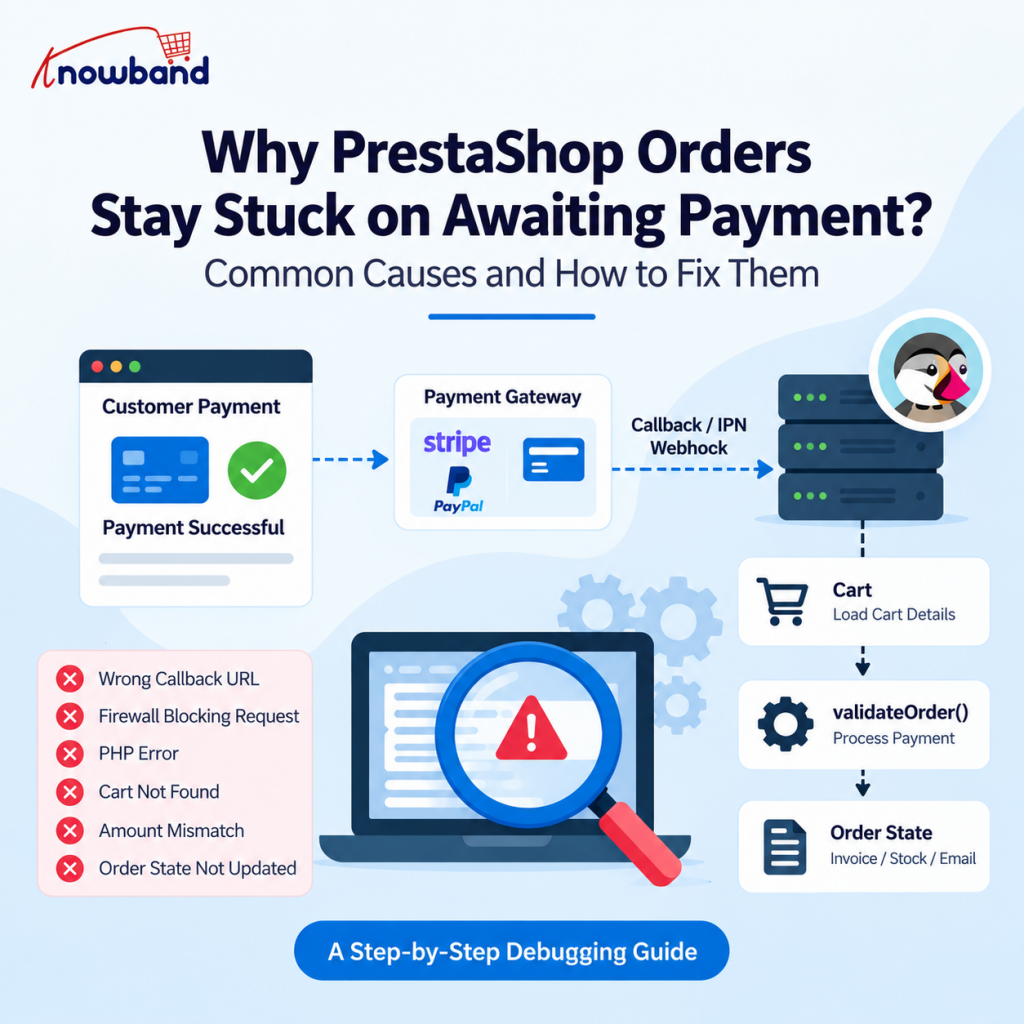
- The gateway never sent the notification.
- The callback URL registered at the gateway is wrong or out of date.
- Something rejected the request before PHP ever ran.
- The callback reached PHP and threw a fatal error.
- The callback ran, but couldn’t load the cart.
- The amount or the currency didn’t match what PrestaShop expected.
- The transaction status wasn’t one the module accepts.
- An order was created, but nobody updated the order state.
Since the symptoms converge, here’s the rule we work by. Prove where it failed before you touch the payment module.
3.0 Step 1: Confirm the Gateway Actually Sent the Payment Callback
Open the gateway dashboard before your editor. Most providers keep a notification log showing the URL, request time and response code, often the retry count and body too. That screen narrows things down fast.
| Gateway result | What it usually means |
|---|---|
| No request logged | URL, network or gateway configuration issue |
| 301 / 302 | Redirect or canonical URL problem |
| 403 | WAF, security rule or access restriction |
| 404 | Wrong or obsolete callback route |
| 500 | PHP, module or server error |
| 200, order unchanged | Callback ran, business logic failed |
| 200, order correct | Callback works, look elsewhere |
3.1 HTTP-to-HTTPS redirects quietly break server-to-server POSTs
Say the gateway holds http://example.com/module/payment/validation while your store forces HTTPS. In a browser that 301 passes unnoticed. Server-to-server, it can go badly. Some HTTP clients drop the request body across a redirect, and when that happens the gateway writes down a failed delivery while your store never sees the payment data at all.
Whatever your store’s canonical URL actually looks like, register that exact string at the gateway. Protocol, domain, the www question, the path, all of it. Leaning on a server-side redirect to nudge the gateway into place isn’t a fix.
3.2 Callback URLs go stale after migrations and upgrades
Gateways keep posting to whatever URL they have on file, with no idea you changed anything. So this shows up after domain migrations, SSL installs, PrestaShop or module upgrades, rewriting changes, or when somebody promotes a staging config to production.
An older integration might still point at a physical file like /modules/payment/validation.php, when the current module exposes a front controller at index.php?fc=module&module=payment&controller=validation. Build those URLs with Link::getModuleLink() and a rewriting change can’t break the route.
Which is why payment testing belongs on every post-migration checklist. Put a real transaction through, all the way to invoice and email.
4.0 Step 2: Check Whether the Request Reached Your Server
Gateway says it tried? Now find out whether the request landed:
grep -i "validation\|ipn\|webhook\|notify" /var/log/apache2/access.log | tail -50
That path assumes Apache. nginx logs to /var/log/nginx/access.log. On cPanel try /home/<user>/logs/, or /usr/local/apache/domlogs/ on older boxes. Plesk buries them under /var/www/vhosts/<domain>/logs/. Wherever you find them, read the status code. POST /module/payment/validation 200 means the request reached the application. 403 means something turned it away before that.
4.1 WAF, ModSecurity and Cloudflare rules block gateway traffic
As far as your infrastructure is concerned, a payment gateway is just some unknown machine posting data at your site. We’ve watched callbacks blocked by ModSecurity rule sets, Cloudflare WAF rules, IP allowlists, HTTP auth, rate limiting and plain old hosting firewalls. It’s easy to miss, because your own browser requests sail through. The gateway’s POST arrives from an unfamiliar IP carrying an odd-looking payload, and that trips the rule.
4.2 Maintenance mode blocks payment notifications too
A merchant flips on maintenance mode and carries on working, because their IP is in PS_MAINTENANCE_IP. The gateway’s IP obviously isn’t, so every notification hits the maintenance page instead of the payment controller. If callbacks died right after somebody did maintenance work, check that the gateway can still reach the URL anonymously.
5.0 Step 3: A 200 Response Does Not Mean the Callback Worked
The gateway logs a clean 200 OK, so everyone assumes the integration is healthy. Meanwhile the order hasn’t moved. A callback can finish perfectly at the HTTP level and still do nothing, because sending a response and processing a payment are separate jobs.
Look at a handler that opens like this:
$cart = $this->context->cart;

if (!Validate::isLoadedObject($cart)) {
    exit;
}
Server returns 200, gateway goes away happy, no order created. The context holds no cart, and nothing later in that request is going to put one there. Wrap the same logic in a try/catch that quietly eats its exception and you get an equally convincing 200 out of it.
5.1 Never depend on the customer session inside an IPN
In a normal checkout PrestaShop builds its context from the browser cookie. A server callback has neither, so your handler rebuilds the transaction from whatever the notification carries:
// getValue() will read GET just as happily as POST. The gateway
// only ever POSTs here, so anything else gets shown the door.
if ($_SERVER['REQUEST_METHOD'] !== 'POST') {
    exit;
}

$idCart = (int) Tools::getValue('custom');
$cart   = new Cart($idCart);

if (!Validate::isLoadedObject($cart)) {
    PrestaShopLogger::addLog(
        'Payment callback: cart not found',
        3,        // 3 = error
        null,     // no error code
        'Cart',
        $idCart,  // bind the cart, or every entry hashes the same
        true      // allowDuplicate. Leave it false and retries vanish.
    );
    exit;
}

// Multistore shops: point the context at the right one first.
$this->context->shop = new Shop((int) $cart->id_shop);
Worth pausing on two lines there. ‘custom’ happens to be PayPal’s passthrough field. Every other provider calls it something else, so read your own gateway’s payload before copying it. Then the last two arguments on addLog(), which are doing real work. PrestaShopLogger hashes the message, severity, error code and bound object, and $allowDuplicate is false by default. Log a fixed string with nothing bound and PrestaShop keeps the first failure, then throws away every identical one after it. While a gateway retries for four days, you’d be logging into a black hole.
You don’t have to build the whole context by hand. validateOrder() rebuilds cart, customer, shop, language and currency from the id_cart you hand it. You do need the right cart ID, plus the right shop on multistore. One more thing. That signature isn’t stable across versions, because PrestaShop 9 tacks on an eleventh $order_reference parameter, so audit any module passing named or reordered arguments before upgrading.
6.0 Step 4: Verify the Transaction Before Creating the Order
Anyone can type payment_status=completed into a return URL. On its own that parameter proves nothing at all. Your module has to go and confirm the payment on its own terms, which depending on the provider means checking a signature, validating against a shared webhook secret, or calling the gateway back to look the transaction up.
PrestaShop’s payment module documentation spells out three rules. Double-check the id_cart, so one customer can’t validate somebody else’s cart. If the order is created after external approval, pull the amount you pass to validateOrder() from the payment system rather than Cart->getOrderTotal(). And verify where the call came from with a signature or token. The official paymentexample module has it all in working code.
7.0 Step 5: Compare the Amount, Currency and Cart Total
The next cluster of failures happens when the gateway’s amount and PrestaShop’s disagree. Discounts do it. So do vouchers, shipping, tax rules, currency conversion, rounding and gateway fees. One cent of drift is enough for a strict module to refuse confirmation.
Log both sides next to each other and the gap jumps out:
[14:22:07] cart 12345  txn ABC123  EUR
          expected 99.99  received 100.00  MISMATCH
7.1 One-page checkout can change the cart underneath the payment module
This gets trickier on stores running a one page checkout, where the cart recalculates every time the shopper touches their address, carrier, country, quantity, voucher or payment method. Inside something like Knowband’s One Page Supercheckout, the totals arriving at the payment module can differ from what you saw testing the default flow.
The test is simple. Push the same payment through both checkouts and compare what reaches the module. Gateway fine in one and broken in the other? Your callback handler is probably innocent.
8.0 Step 6: Check Order-State Handling in PrestaShop
Callback verified, amount matches, order exists, status still wrong. Now we can talk about order states.
They drive behaviour in PrestaShop rather than just labelling it, deciding whether payment counts as received, whether an invoice is generated, whether stock moves and which emails go out. An immediate capture should land on the built-in paid state. Anything asynchronous opens pending and moves to paid once the webhook confirms.
Run the transition through OrderHistory rather than writing to the database yourself, because that class is what fires actionPaymentConfirmation and actionOrderStatusUpdate:
$history = new OrderHistory();
$history->id_order = (int) $order->id;

// Takes an Order object or an ID. Sets id_order_state for you.
$history->changeIdOrderState(
    Configuration::get('PS_OS_PAYMENT'),
    $order
);

$history->addWithemail(true); // writes the row, sends the mail
When an order shows as paid but the invoice, stock movement or confirmation email never materialises, somebody almost certainly wrote the status directly.
9.0 Step 7: Make the Callback Idempotent, Because Duplicate IPNs Are Normal
Gateways retry, and they retry a lot. PayPal’s Instant Payment Notification service keeps resending for up to four days if your listener doesn’t acknowledge, and warns outright that IPN isn’t real-time. Timeouts, odd response bodies and network blips all produce repeat deliveries.
Two problems hide in here, needing different answers.
Sequential retries, the same notification arriving again minutes later, are handled by asking whether the cart already produced an order:
if ($cart->orderExists()) {
    // Send whatever ack your gateway wants, then get out.
    exit;
}
Concurrent arrivals are harder. Browser return and server callback can hit the shop milliseconds apart, both sprinting toward order creation. Cart::orderExists() is nothing more than a SELECT count(*) with no locking, so two simultaneous requests can both sail past before either inserts. Closing that window needs a real lock, either a MySQL named lock keyed on the cart ID or SELECT … FOR UPDATE against the cart row inside a transaction. Which fits depends on your database engine and hosting, so test it rather than taking our word.
Then test both. Replay one payload twice in a row, fire two copies at once, and neither should produce a second order.
10.0 Step 8: Read the PrestaShop and PHP Logs
A 500 from the callback means reading logs, and this is where people lose hours, because PrestaShop writes to two unrelated places.
PrestaShopLogger::addLog(), including the call back in Step 3, inserts rows into the ps_log database table, which you’ll find under Advanced Parameters, then Logs. The var/logs/ directory is something else entirely, holding Symfony and Monolog output. Anything logged via addLog() never shows up in var/logs/, and a PHP fatal never shows up in ps_log. For fatals, read the PHP and web server error logs.
Debug mode (_PS_MODE_DEV_) surfaces the exception behind a blank 500, but hands internal paths and stack traces to anyone loading the site. Use it in staging. On production, keep it brief and inside an agreed change window.
Callbacks fall over on undefined array keys, type errors, missing classes, API exceptions, database errors and module conflicts. This matters most after an upgrade, since a payment module sits between PrestaShop, PHP, the gateway API, the checkout layer and your hosting, and moving any one can change the outcome. The technical validation checklist makes a decent baseline for what to re-test.
11.0 When the Payment Option Breaks Before the IPN
Plenty of checkout payment problems have nothing to do with callbacks. Methods that flicker in and out, bank lists that refuse to open, an embedded payment section that vanishes on refresh. Those live earlier in the lifecycle, and JavaScript is usually behind them.
Swap out part of the DOM in a one page checkout and any handlers bound to the old elements die with it. Looks like a gateway outage, except no request was ever sent. Check the console, watch the network tab for the call that should have fired, and see whether the widget re-initialises after the checkout re-renders.
12.0 Replay the Callback and Log What Matters
Two habits shorten every investigation after this one.
First, replay rather than re-pay. Most gateways ship an IPN simulator; if yours doesn’t, replay a captured payload:
curl -i -X POST -d @payload.txt \
  https://staging.example.com/module/payment/validation
Staging only, please. Fire that at a live store and you’ve made a real order on a real cart, several if idempotency is broken.
Second, log the callback before you need it. Capture timestamp, cart ID, transaction ID, gateway status, currency, both amounts, signature result, order ID and final state. Never card numbers, CVVs or secrets. A line like Cart: 18425 | TXN-89321 | EUR | Expected 149.99 | Received 149.99 | Signature VALID | Order 10382 diagnoses itself.
And since notifications can arrive days late, a cron job that hunts down long-pending orders, asks the gateway what really happened and updates them turns a missed webhook into a delay, not a lost sale.
13.0 Security: Never Let a Callback Become a Free-Order Endpoint
Your callback URL is public, so anybody who finds it can post to it, and payment_status=success alone must never be enough to produce a paid order. Only controls the gateway takes part in genuinely authenticate a notification: signature or HMAC verification against a shared secret, or a transaction lookup through the gateway’s API.
One clarification, because it trips people up. The $secure_key argument on validateOrder() is not callback authentication. It compares the value you pass against $cart->secure_key on the cart you just loaded, which guards the return URL against somebody guessing cart IDs. A gateway has no idea what your secure key is, so inside an IPN the only value you can pass is the one read off that same cart, and the comparison goes circular. Useful on the return URL. Worthless as proof a notification is genuine.
PayPal, PayU, Stripe and Mollie each have their own vocabulary, but the questions never change: where payment starts, where it is confirmed, how the callback is authenticated, and what happens when it arrives twice.
14.0 A Practical PrestaShop Payment Callback Checklist
[ ] Payment successful at the gateway?
[ ] Gateway attempted the callback, and what status did it record?
[ ] Callback URL correct: protocol, www/non-www, domain, route?
[ ] Request visible in the web server access log?
[ ] No WAF, Cloudflare, ModSecurity or maintenance-mode block?
[ ] ps_log AND var/logs AND the PHP error log checked?
[ ] Callback payload logged with allowDuplicate enabled?
[ ] Cart, customer and shop loadable without a browser session?
[ ] Signature or transaction verified with the gateway?
[ ] Amount and currency match the cart?
[ ] Correct order state applied via OrderHistory?
[ ] Sequential replay creates no duplicate order?
[ ] Concurrent replay creates no duplicate order?
[ ] Test/live credentials and environment match?
Give that last one proper attention. Configuration mismatches turn up more often than code bugs and take far less time to fix. A sandbox transaction never triggers a production callback. Expired credentials break verification while the payment button sits there looking fine. Rotate a secret and the gateway reports success while your module rejects everything.
Final Thoughts: Find the First Broken Link
Good payment integration has less to do with the happy path than with everything that happens when it falls apart. Customers close windows. Gateways retry. Webhooks show up late, firewalls block, carts recalculate.
So when a PrestaShop payment callback fails, don’t reach for the payment module first. If the notification never reached your server, rewriting validateOrder() achieves nothing. If it returned 200 but couldn’t load the cart, new credentials won’t help. If the amount is off, fixing the webhook URL is wasted effort.
Swap the question. Rather than asking why PrestaShop didn’t create the order, ask whether the callback got to your server and what happened once it did. That turns a vague complaint into a short list of checks.
And if you run a customised checkout, confirm every payment method behaves the same inside it. Test each through both checkouts before a customer finds the gap first.
If you have questions or need assistance with your website performance or migration, our experts are here to help. Contact the Knowband team at [email protected] today for reliable eCommerce plugins tailored to your eCommerce needs.

