
Over 49% of customers will switch to a competitor after just one poor experience. Most of them will not tell you what went wrong; they will just leave. A customer satisfaction survey gives those customers a channel to tell exactly what went wrong. Setting up a satisfaction survey in PrestaShop does not require a developer or a third-party survey platform. The right setup lives inside the store, triggers at the right moment, and feeds the responses directly into the admin panel. A good PrestaShop Survey Builder solution is best for creating customer satisfaction surveys directly inside your store, allowing you to collect real-time feedback, improve customer experience, and reduce customer drop-offs. Here is how to build and run one properly.
Why Customer Satisfaction Surveys Work Better Than Star Ratings Alone
Product reviews capture emotion. A customer who received a damaged item leaves one star. A customer who loved the product left a five-star rating. Neither tells you much about what actually drove the outcome.
A PrestaShop Survey Builder approach gives you structured, specific data. You choose what to ask, when to ask it, and how to format the question. That control is the difference between knowing your average rating and knowing why it is what it is.
Recent eCommerce benchmarks place the average CSAT score at 82% for online merchants. If your repeat purchase rate or return rate is telling a different story, a structured PrestaShop Survey Builder is usually where the gap shows up first.
What to Ask in a PrestaShop Customer Satisfaction Survey
Short surveys get higher completion. Two or three focused questions that take under 40 seconds on a phone produce more usable responses than a ten-question form that half the respondents abandon halfway through.
For a post-purchase survey on an eCommerce store, these three areas cover the most useful ground:
- Overall satisfaction: a single rating question using radio buttons on a 1 to 5 scale. Simple, quick, and gives you a trackable customer satisfaction score over time.
- What worked well: an open text field with a short prompt. Customers who are happy want to tell you why. These answers tell you what to protect.
- What could be better: another open text field. Customers who had a minor friction point but still completed the order are your most useful critics. They bought, so they are not bitter. They noticed the problem, so the feedback is specific.
A fourth question about how they heard about the store adds attribution data if that is useful for your marketing team, but keep it optional. Required fields on a feedback form push people to abandon.
How to Build the Survey in PrestaShop Without Coding
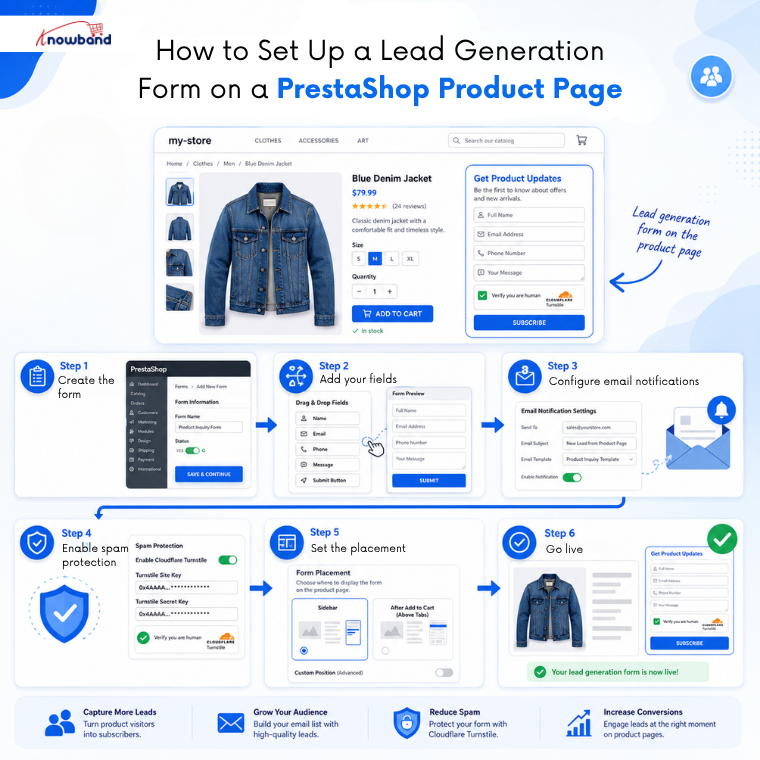
The PrestaShop Form Studio module handles the full build inside the admin panel. No coding, no external platform, no iframe embeds.
Open the module, click Add New Form, and give the form a clear internal name. The form builder uses a column-based layout, so choose a single column for a satisfaction survey since it keeps the focus on one question at a time.
Add a radio button field for the rating question. Label the options clearly, 1 (Very Dissatisfied) through 5 (Very Satisfied), works better than a plain number scale because respondents do not have to guess which end is positive.
Add two text area fields for the open-ended questions. Set both as optional. Mark the rating field as required if you want a minimum data point from every submission, but keep everything else optional to protect the response rate.
Under Mail Settings, configure the admin email notification so every submission arrives in your inbox. Write a clear subject line, something like “New Satisfaction Survey Response” makes it easy to filter. An auto-responder to the customer is worth enabling here too; a brief acknowledgement that their feedback was received and is appreciated takes seconds to set up and makes customers feel heard.
Where to Place the Survey for the Best Response Rate
Placement is where most merchants get this wrong. A generic “Tell us what you think” link in the footer gets ignored. A PrestaShop customer feedback form that appears at the right moment in the customer journey gets completed. Form placement is one of the most overlooked decisions in survey setup, and one of the most impactful on how many people actually finish it.
For a post-purchase PrestaShop customer feedback form, the order confirmation page is the highest-converting placement. The customer has just bought. Their experience is fresh. The decision to purchase is behind them, so there is no anxiety about influencing their own choice. Place the PrestaShop Survey Builder form below the order summary on the confirmation page using the Checkout Page position in the module’s display settings.
A CMS page with a standalone URL is a good second option. Send the link in the order confirmation email with a short line asking for feedback. Customers who do not see the form at checkout can access it directly.
If you want to collect ongoing product feedback separately from the purchase experience, product page placement below the product images works well for specific items, particularly high-ticket products, where detailed pre-purchase and post-purchase feedback is valuable.
Protecting the Survey From Bot Submissions
Any form placed on a public-facing page will attract bots. A dataset full of automated spam submissions makes the results meaningless and clutters the admin panel with noise.
The module includes Cloudflare Turnstile for spam protection. Enable it in the form settings. Turnstile runs silently in the background; genuine customers never see a challenge or CAPTCHA step. Bot submissions are blocked before they reach the submission log.
What to Do With the Feedback Data
Collecting responses is only useful if the data goes somewhere. Every submission lands in the admin panel under the module’s submission management section. Responses are filterable by date and exportable, run a weekly export to a spreadsheet and track the average rating score week over week.
The open-text responses are where the real value sits. Read through the “what could be better” answers every week and look for patterns. If three separate customers mention difficulty finding product size information, that is a product page copy problem. If five mentions slow delivery, that is a fulfilment issue worth addressing at source.
If you have Mailchimp or Brevo connected through the module’s Mailchimp integration settings, respondents who opt in can be added to a follow-up sequence automatically. Customers who left a low score are candidates for a personal follow-up. Customers who scored 4 or 5 are candidates for a review request.
Running the Survey Ongoing, Not Just Once
A customer satisfaction survey is not a one-time exercise. The average eCommerce CSAT benchmark changes as the store changes, new shipping partners, updated product ranges, pricing adjustments, and checkout changes all affect satisfaction in ways that a static review system will not catch quickly enough.
A running PrestaShop Survey Builder on the order confirmation page means the data updates continuously. A quarterly review of the submissions tells you whether satisfaction is moving in the right direction or whether something that changed recently is causing friction that nobody has flagged through other channels.
The Knowband PrestaShop Form Studio puts no limit on forms or submissions. Once the satisfaction survey is live, the data starts accumulating without any recurring effort.
For more such reads, you can visit:


